







If you have ever priced out AWS IAM Roles Anywhere for your team, you already know the catch. The service itself is free. However, it requires a Certificate Authority to issue the certificates that identify your applications, servers, and developers. AWS’s managed option for that, ACM Private CA, starts at roughly $400 a month. For a lot of teams, that single line item is enough to shelve the whole idea and fall back on long-lived access keys.
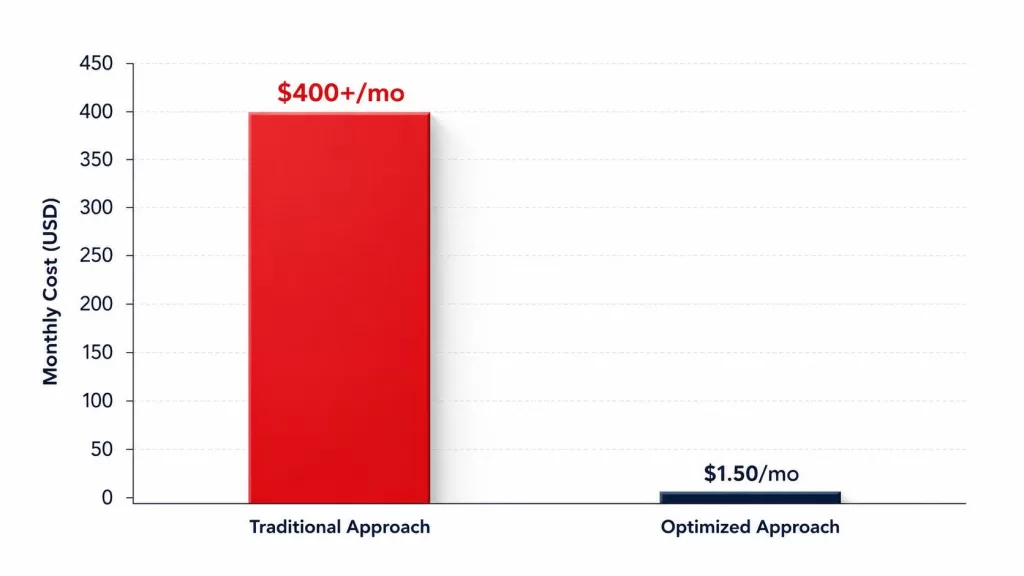
We wanted to flag a project that removes that blocker entirely. One of our own engineers, Viresh Solanki, built and open-sourced a complete Certificate Authority for AWS IAM Roles Anywhere. It costs around $1.50 a month instead of $400. It’s available now on GitHub as iam-roles-anywhere-automation. In this guide, we’ll walk through what AWS IAM Roles Anywhere actually does, why the Certificate Authority piece matters so much, and how this particular project solves it.
What AWS IAM Roles Anywhere Actually Solves
Most AWS security incidents that make the news trace back to the same root cause. A long-lived access key leaked somewhere it should not have: a public GitHub repo, a Slack message, a misconfigured CI job. Once that key is out, it stays valid until someone notices and manually revokes it.
AWS IAM Roles Anywhere exists to remove that risk. Instead of issuing permanent access keys to servers, containers, or on-premises workloads, it lets those systems present a short-lived X.509 certificate. In return, they receive temporary AWS credentials. The certificate proves identity; the temporary credentials do the actual work, and they expire on their own. As a result, a leaked certificate is a far smaller problem than a leaked access key. It can be revoked instantly, and it typically wasn’t going to live long anyway.
This matters most for workloads that live outside AWS: on-premises servers, other cloud providers, CI/CD runners, and edge devices that still need to call AWS APIs. Rather than hardcoding credentials into those environments, Roles Anywhere gives them a certificate-based path. That path leads to the same temporary-credential model that EC2 instance profiles and Lambda execution roles already use.
Getting the Terminology Straight First
The word “role” and the word “profile” both show up more than once in this system. So it’s worth pausing on definitions before going further:
- IAM Role — the actual AWS permissions container. This is what grants or denies access to S3, DynamoDB, and everything else.
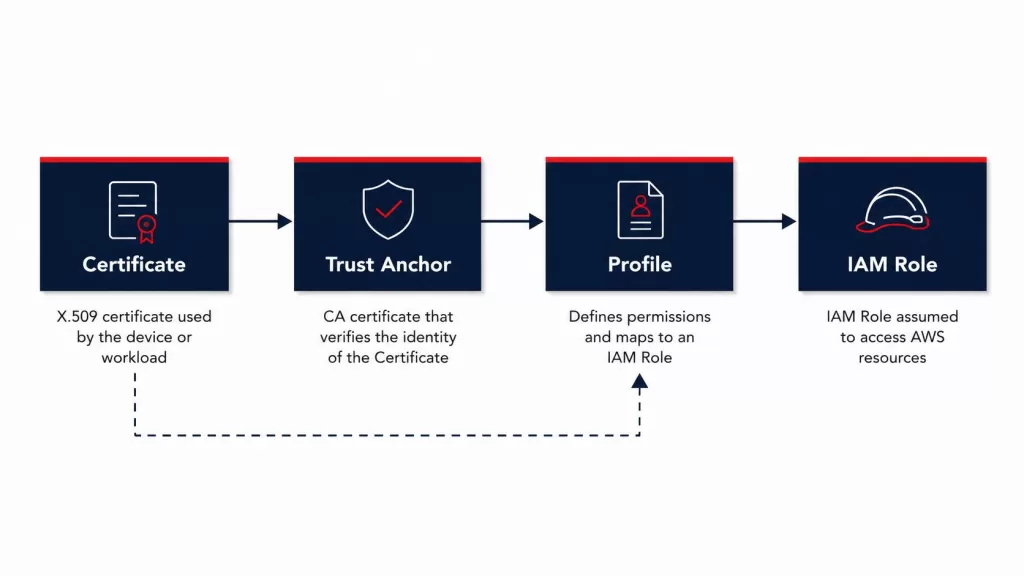
- Roles Anywhere Trust Anchor — an AWS resource that says “I trust certificates signed by this specific CA.” You create one per CA.
- Roles Anywhere Profile — a separate AWS resource. It binds a Trust Anchor to one or more IAM Roles, and sets how long the resulting session can last.
- AWS CLI Profile — an entirely unrelated, purely local concept: a named block in your
~/.aws/configfile. It shares a word with the Roles Anywhere Profile above, but has nothing to do with it.
Once those four pieces are distinct in your head, the rest of the architecture is simple. A client holds a certificate. AWS trusts that certificate because of the Trust Anchor. The Profile decides which Role that certificate can assume. AWS then hands back temporary credentials for that Role.
Why the Certificate Authority Is the Hard Part
AWS IAM Roles Anywhere itself is free to use. There’s no per-request or per-credential charge for the service. The cost and complexity sit entirely in the Certificate Authority you plug into it. You have three realistic paths:
- ACM Private CA — AWS’s own managed CA product. It works well and requires almost no setup. However, it carries a flat monthly fee north of $400, regardless of how many certificates you actually issue.
- A self-managed OpenSSL CA — free, but the private key typically lives on somebody’s laptop. Renewal and revocation are manual, and there’s no audit trail beyond whatever you build yourself.
- A custom KMS-backed CA — the private key never leaves AWS Key Management Service, so it’s never exportable. Signing happens on demand. Building one from scratch, though, means hand-rolling X.509 certificate generation, which is not a small undertaking.
That third path is exactly what Viresh built and published.
Inside the Open-Source Project
The iam-roles-anywhere-automation repository ships two complete, working implementations. That’s a deliberate choice, since different teams land in different places on the cost-versus-scale spectrum.
Local CA — For Solo Developers and Proofs of Concept
In this path, OpenSSL generates and stores the CA’s private key right on your own laptop. Deployment runs through a single deploy.sh script plus an AWS CloudFormation template. Together they stand up the Trust Anchor, Profile, and Role. It’s a fast way to test Roles Anywhere end to end. Still, it suits small teams best — realistically one to ten users — since a lost laptop means a lost CA.
Central CA — For Teams and Production Workloads
This is the more interesting half of the project. The CA private key lives inside AWS KMS as an asymmetric key that can never be exported. AWS KMS signs every certificate through a kms:Sign call instead. A single CloudFormation stack auto-bootstraps the entire pipeline, with no local CLI steps required. It also adds several things a laptop-based CA can’t offer:
- Automatic certificate renewal, with the previous certificate revoked the moment a new one is issued
- A DynamoDB-backed audit trail tracking every certificate’s full lifecycle: issued, renewed, revoked, and why
- Instant revocation through a CRL that AWS honors within seconds
- A public HTTPS onboarding endpoint, secured with an API key, so developers can request their own certificates without ever touching AWS credentials directly
The certificate-generation code itself is worth calling out. kms_ca.py is a roughly 240-line, dependency-free X.509/DER encoder. There’s no external cryptography library involved — just hashlib, base64, and hand-written ASN.1 encoding. It’s small enough to read start to finish, so a security reviewer can audit 100% of the certificate logic in about ten minutes, rather than trusting an imported package blindly.
What This Actually Costs
The gap between this project and ACM Private CA is the whole reason it exists. So the numbers are worth putting side by side.
| Component | Central CA (this project) | ACM Private CA |
|---|---|---|
| KMS asymmetric key | ~$1.00/mo | — |
| Lambda (issuance, renewal, revocation) | ~$0.20/mo | — |
| DynamoDB (on-demand, per-cert tracking) | ~$0.25/mo | — |
| S3 (CA cert + CRL storage) | <$0.01/mo | — |
| Flat platform fee | — | $400+/mo |
| Total | ~$1.50/mo | $400+/mo |
That gap holds up at scale, too. A modeled 2,000-user deployment comes out to roughly $1.25 a month, based on an AWS Pricing Calculator estimate built against the resources this stack actually provisions. Scaling further, from 2,000 to 10,000 users, mostly adds a little more Lambda and DynamoDB request volume. That extra volume stays comfortably inside free-tier or fractions-of-a-cent territory, because the $1-a-month KMS key fee doesn’t change no matter how many certificates it signs.
How It Stacks Up Against Other Options
The repository’s README includes an unusually candid comparison against other public projects covering similar ground, rather than presenting itself as the only option. Here’s the short version: aws/rolesanywhere-credential-helper is the official AWS client binary, not a competing CA. In fact, this project uses that exact binary on the client side rather than replacing it. AWS’s own sample automation repo is well-built, but it deploys ACM Private CA underneath. That reintroduces the $400/month cost this project exists to avoid. A separate AWS sample demo is explicitly labeled “not production-ready,” and it doesn’t implement renewal or revocation at all.
For teams that specifically want to eliminate the ACM Private CA cost, while keeping renewal, revocation, and an audit trail, the Central CA path is the one built to match that requirement directly.
Security Considerations Worth Knowing
The project documents its threat model openly, rather than glossing over trade-offs. We appreciate that in any open-source infrastructure tool. A few points stand out:
- The server validates the certificate’s Common Name, so a client can never claim an identity it wasn’t issued.
- The public onboarding endpoint requires a shared API key, enforced by API Gateway before the Lambda function ever runs.
- Only admins can renew a certificate. Simply knowing a serial number isn’t proof that you hold the matching private key.
- If a Local CA’s private key is lost, every certificate it issued becomes permanently invalid. That’s one more reason production teams should lean toward the KMS-backed Central CA path.
The commit history also documents real production bugs the project hit along the way. One example: an AWS Organizations service control policy silently blocked a public Lambda Function URL, and the fix required switching approaches entirely. Another example is a deliberate decision not to follow an AWS Console suggestion that would have opened a security hole. That kind of detail is a good signal. It shows the team tested the project against a live AWS account, rather than writing it purely from documentation.
Where This Fits Into a Broader AWS Security Strategy
Removing permanent access keys is one piece of a larger picture. If your team is also formalizing how infrastructure gets provisioned, it’s worth pairing this project with a proper infrastructure-as-code practice on AWS. That way, Trust Anchors, Profiles, and Roles get defined in version control, rather than clicked together by hand.
Teams running multi-tenant SaaS platforms will also recognize the account-isolation questions this project touches on. We’ve covered the account-per-tenant versus shared-cluster trade-off in more depth in our guide to AWS multi-tenant isolation on EKS. Many of the same identity-boundary decisions apply whether you’re isolating tenants or isolating on-premises workloads through Roles Anywhere.
Once certificate-based access is in place, cost visibility becomes the next natural question, especially for teams running Roles Anywhere across dozens of on-premises or CI/CD identities. Our recent piece on the AWS FinOps Agent covers how AI-assisted cost investigation is starting to handle exactly that kind of sprawl.
If you’re earlier in your cloud journey and haven’t yet had a structured look at your AWS environment, an AWS Well-Architected Review is a reasonable place to start. From there, layering in a project like this one gets much easier.
Frequently Asked Questions
Is AWS IAM Roles Anywhere itself free? Yes. There is no charge for the Roles Anywhere service. The cost comes entirely from whichever Certificate Authority you connect to it.
Do I need to use this specific open-source project to use Roles Anywhere? No. You could build your own CA, use ACM Private CA, or use another open-source option. This project is simply a tested, documented path that specifically targets the cost problem.
Can this be used with Kubernetes, Docker, or ECS? Yes. You can mount the private key and certificate as secrets, then run AWS’s aws_signing_helper binary as the credential_process inside the container’s AWS CLI configuration.
What happens if the Local CA’s private key is lost? Every certificate it issued becomes permanently invalid, and you have to regenerate the CA from scratch. This is the main reason the project recommends the KMS-backed Central CA for anything beyond a proof of concept.
How many users can the Central CA path support? The architecture runs on DynamoDB on-demand capacity, Lambda, and API Gateway, all of which scale automatically. The project’s own testing and cost modeling covers deployments up to several thousand users.
Our Take
We think it’s worth highlighting projects like this one. Not because we built it top-down as a company initiative, but because one of our engineers ran into a real cost problem, solved it properly, and put the work out where other teams can use and audit it. Whether your organization is weighing IAM Roles Anywhere, evaluating ACM Private CA’s pricing, or simply trying to get rid of long-lived AWS access keys, this is a solid starting point to test against your own environment.
Want our AWS team to walk through your specific identity and access setup, Roles Anywhere included? Schedule a free 30-minute cloud consultation and we’ll take a look together.
You can also follow more of Viresh’s work directly on LinkedIn.