






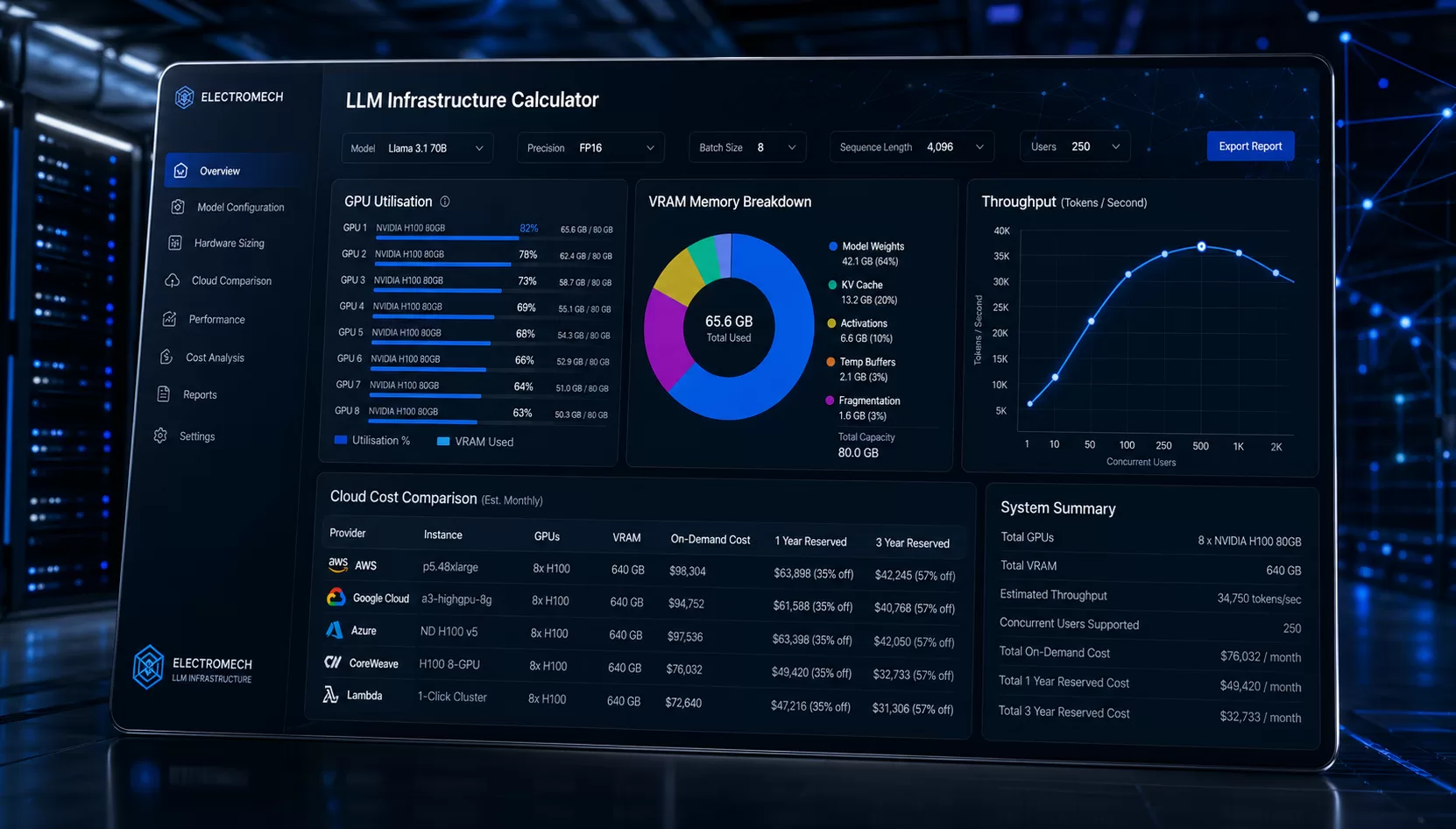

“Running an LLM in production shouldn’t require a PhD in hardware engineering — it should require the right tool.”
— Kishan Khatrani, CTO, Electromech
If you are searching for an LLM infrastructure planning tool that goes beyond rough estimates, you have found it. Electromech’s CTO, Kishan Khatrani, built LLMcalc — a free, open-source, fully browser-based LLM infrastructure planning tool that calculates GPU needs, VRAM use, cloud costs, on-prem TCO, and user capacity in seconds. There is no account needed, no backend, and no guesswork involved.
In this post, we explain what the tool does, why Kishan built it, who it is for, and how you can start using it today.
The Problem Every AI Team Faces Before Deployment
Deploying a large language model in production is one of the most hardware-intensive decisions a modern engineering team makes. The models are widely available. Furthermore, the use cases are increasingly clear. However, for most organisations, the real blocker is the unglamorous work of figuring out what hardware is actually needed.
Teams routinely ask questions such as:
- How much VRAM does this model use at our context window and batch size?
- Which GPU tier can handle it — and with how much room to spare?
- Is it cheaper to run on AWS, Azure, or our own data centre over an 18-month period?
- Can we serve 500 users at the same time without breaking our latency targets?
Most teams answer these questions with old forum posts, rough rules of thumb, and trial-and-error. As a result, that approach is expensive, slow, and hard to defend to leadership. A proper LLM infrastructure planning tool changes all of that.
Who Built It and Why
Kishan Khatrani is the Chief Technology Officer at Electromech. He is one of the most hands-on leaders in our company — someone who builds the tools his team needs rather than just setting direction.
Kishan noticed that AI teams everywhere were making infrastructure decisions on incomplete data. Rather than accepting this as normal, he built a solution. The result is LLMcalc, a production-grade LLM infrastructure planning tool that he then open-sourced so every team in the industry could benefit from it.
After Kishan shared the tool on LinkedIn, it drew immediate attention from ML engineers, infrastructure architects, and CTOs who recognised the gap it was closing. Specifically, practitioners welcomed a tool that gave them real numbers instead of ballpark guesses.
Connect with Kishan on LinkedIn: linkedin.com/in/khatrani-kishan Original LinkedIn announcement: View Kishan’s post
What Is LLMcalc — The LLM Infrastructure Planning Tool?
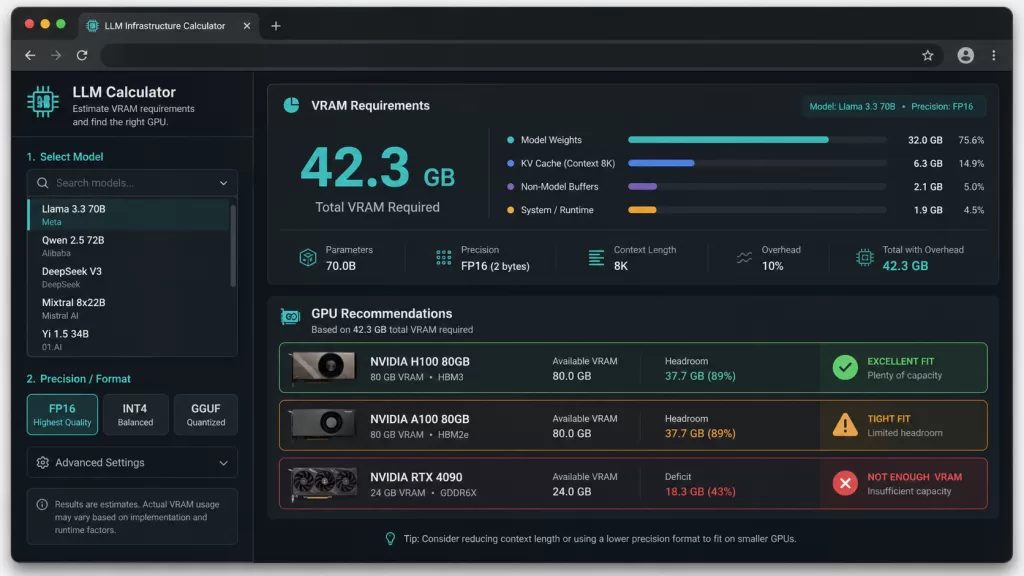
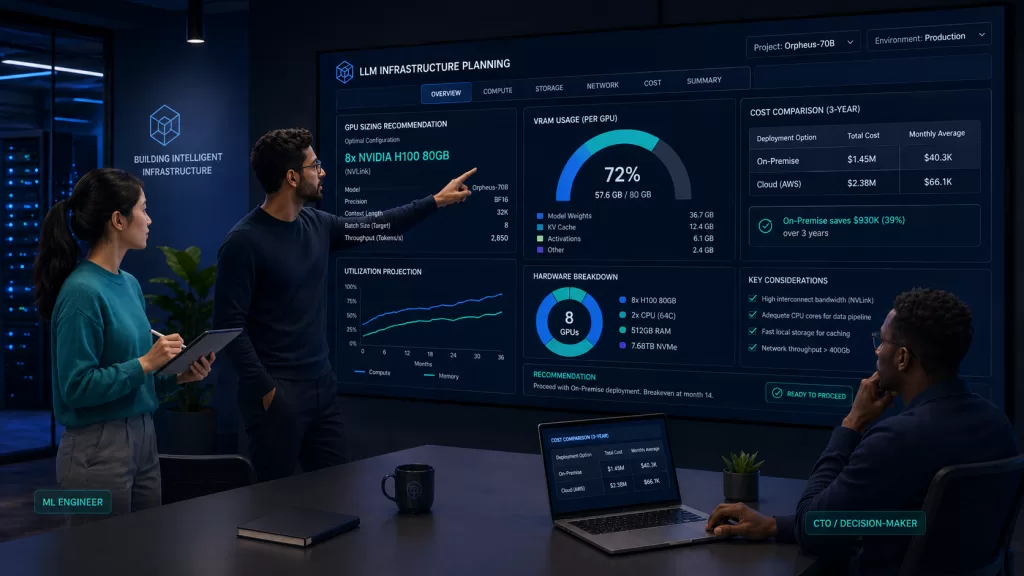
LLMcalc is a client-side, open-source LLM infrastructure planning tool. You enter your workload details — model, precision format, batch size, context length, and deployment mode — and the tool returns accurate, engineering-grade answers across every part of your infrastructure decision.
🔗 GitHub: github.com/kkpkishan/llm-infra-planner
Notably, the tool is built on a large, carefully maintained dataset:
- 513 production LLM models — Llama, Mistral, Qwen, DeepSeek, Gemma, Phi, Grok, Falcon, Cohere, and 60+ more families
- 147 GPUs across 12 vendors — NVIDIA, AMD, Apple Silicon, Google TPU, AWS Trainium, Cerebras, and others
- 37 cloud instances from 8 providers — AWS, Azure, GCP, Lambda, RunPod, Vast.ai, CoreWeave, Together AI
- 244 property-based tests that check every formula across 19 test files
<!– IMAGE: Screenshot of the LLMcalc main calculator interface Alt text: “LLMcalc LLM infrastructure planning tool showing VRAM breakdown and GPU recommendations” –>
What the LLM Infrastructure Planning Tool Calculates
GPU Memory and VRAM Breakdown
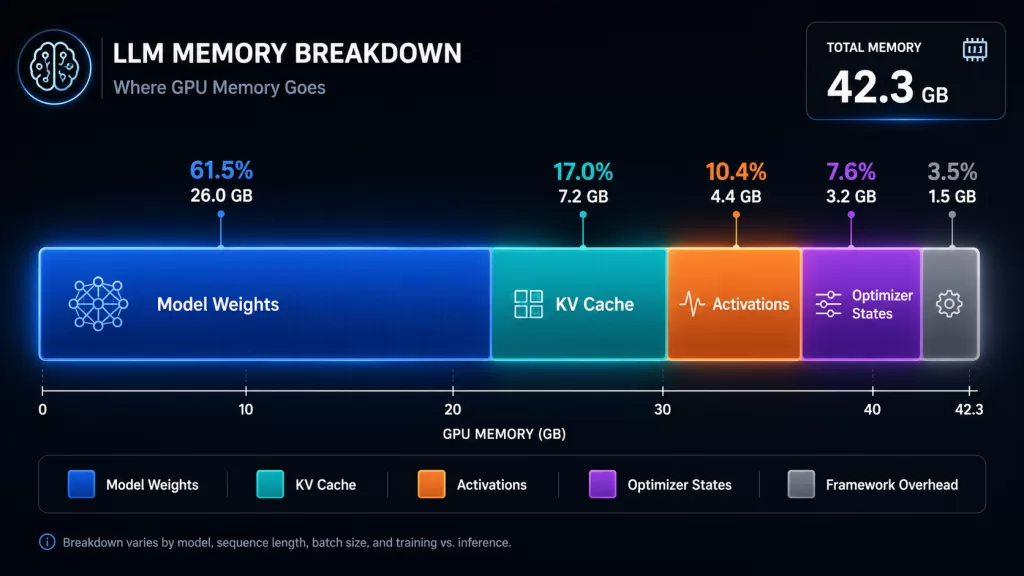
Underestimating VRAM is the most common and costly mistake in LLM deployment. Model weights are only part of the story. In addition, LLMcalc accounts for every other memory component:
- Weights — calculated per precision format: FP32, FP16, BF16, INT8, INT4, GGUF Q4_K_M, Q5_K_M, Q8_0
- KV cache — scaled by sequence length, batch size, attention heads, and layers
- Activations — especially important during fine-tuning; shown as a separate line item
- Gradients and optimizer states — up to 14 bytes per parameter for Adam during full training
- Framework overhead — CUDA context and PyTorch memory buffers
As a result, you see exactly where every gigabyte goes before you provision a single GPU. <!– IMAGE: VRAM breakdown chart showing weights, KV cache, activations, and overhead segments Alt text: “LLM VRAM breakdown chart showing memory allocation for weights KV cache and activations” –>
GPU Selection and Fit Analysis
LLMcalc holds a database of 147 GPUs across 12 vendors. It ranks compatible options by tier — Budget, Balanced, and Performance — with usage bars that show available headroom at your specific workload settings.
| Vendor | Coverage |
|---|---|
| NVIDIA | RTX 20/30/40/50, RTX Ada/Pro workstations, A100, H100, H200, B100, B200, GB200 |
| AMD | RX 7900 XTX consumer, MI300X / MI325X datacenter |
| Apple Silicon | M1 through M4, all chip tiers |
| Intel | Arc consumer, Gaudi datacenter |
| TPU v4, v5e, v5p | |
| Specialists | AWS Trainium, Cerebras WSE-2/3, Groq LPU, Tenstorrent, Qualcomm, Huawei Ascend |
Cloud Cost Comparison Across 8 Providers
LLMcalc computes cost-per-million-tokens — the only cost measure that truly reflects your workload efficiency — and shows it in a sortable table across AWS, Azure, GCP, Lambda Labs, RunPod, Vast.ai, CoreWeave, and Together AI. Both on-demand and spot prices are included. Consequently, you get a direct answer to the question: “Which provider gives the best value for this exact model and workload?” — without opening six different pricing pages.
On-Premises vs Cloud TCO Analysis
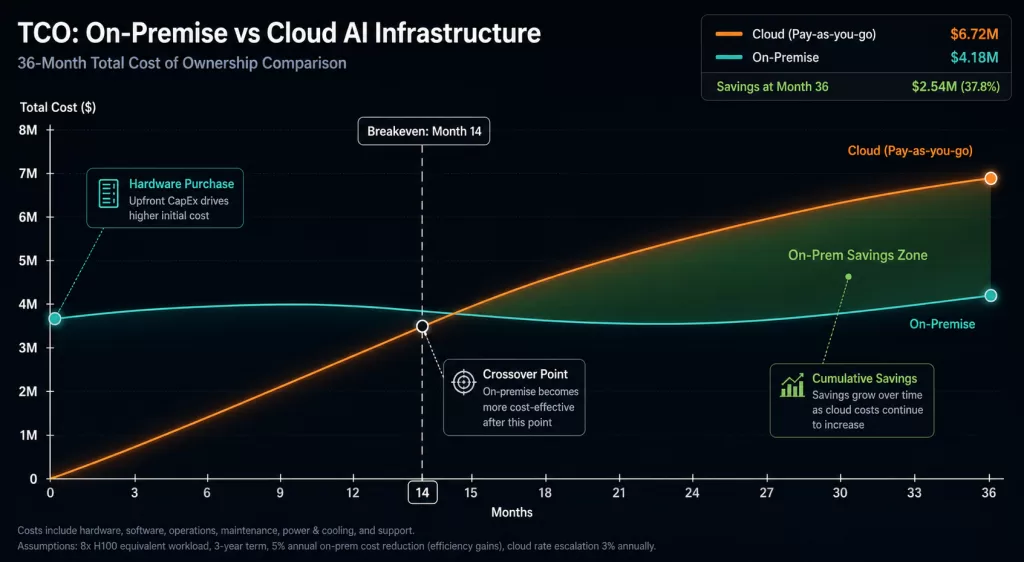
For organisations that are thinking about owning GPU hardware, the key question is not “can we afford it?” — it is “when does buying become cheaper than renting, and by how much?”
The TCO panel models the full cost picture, including:
- Capital costs and hardware depreciation
- PUE (Power Usage Effectiveness) and electricity rates by region
- Co-location fees — rack space, power, and cooling
- Engineering staff time for on-prem management
The output is a breakeven chart that shows the exact month when on-prem becomes cheaper than cloud, along with the total cost gap over your full planning period. Therefore, this analysis is ready to drop into a capital budget proposal — and it takes only seconds to produce. <!– IMAGE: On-prem vs cloud TCO breakeven chart Alt text: “On-premise vs cloud AI infrastructure TCO breakeven analysis chart from LLMcalc” –>
Concurrent User Capacity Planning
The most important operational question for production AI is not “can the GPU run this model?” — it is “how many users can it serve at once while still meeting our speed targets?”
LLMcalc’s capacity planner models load with adjustable targets for:
- TTFT (Time to First Token) — how long before the user sees any output
- TPOT (Time Per Output Token) — how fast the response streams afterwards
The slider goes up to 10,000 users. You can, therefore, see exactly where your setup starts to slow down and when you need to add more replicas.
Throughput and Latency Modelling
Throughput estimates in LLMcalc use the roofline model, a well-established method from high-performance computing that ties performance to hardware memory bandwidth and processing capacity. This approach gives estimates grounded in physics rather than marketing claims.
Specifically, the tool provides separate prefill and decode throughput figures, a latency curve showing how speed changes under load, and speculative decoding speedup estimates for six strategies: draft model, Medusa, EAGLE-2, EAGLE-3, Lookahead, and Prompt Lookup.
Distributed and Multi-GPU Planning
For workloads that need more than one GPU or more than one node, LLMcalc covers the full distributed setup picture.
Parallelism strategies with topology diagrams:
- Tensor parallelism
- Pipeline parallelism
- ZeRO-3 (DeepSpeed)
- MoE (Mixture of Experts) parallelism
Multi-node cluster planning includes:
- Node and GPU count configuration
- Interconnect comparison: NVLink, InfiniBand, PCIe
- Failover planning with replica counts and cost calculations
Storage, Network, Power, and Full Stack Planning
Beyond GPU planning, LLMcalc also covers the rest of your infrastructure stack:
- Storage: Checkpoint sizes, disk IOPS needs, and model file sizes by format
- Network: Inter-node bandwidth needs for distributed training
- Power: Power draw estimates and energy cost over time
- Tokenizer: Vocabulary size, embedding VRAM, and token fertility rate
- Multimodal: Vision encoder memory for VLMs
- Dataset: Training dataset size and token count estimates
- Auto-scale: Replica scaling points and cost impact
Reverse Mode: Start From Your Hardware
Do you already have GPU hardware and want to know which models will fit? Reverse Mode flips the tool around. You pick a GPU — or enter a custom VRAM amount — set your context length, and get back every model in the 513-model database ranked by fit. Models that exceed your VRAM show the minimum quantization level needed to make them work.
Compare Mode and Shareable URLs
You can pin up to three setups side by side. Numeric differences are shown against your main config — green for better, red for worse — across VRAM, throughput, cloud cost, and cost-per-million-tokens.
Moreover, the full calculator state is encoded in the URL. This means you can send a link to a colleague and they will see exactly the same setup, without needing an account or login.
The Engineering Rigour Behind It
This is not a spreadsheet with rough rules. Instead, the calculation engine is built from pure TypeScript functions with no side effects, each validated by 244 property-based tests across 19 test files. Property-based testing checks formulas across randomised input ranges — not just the examples a developer chose to test.
| Formula Component | Method |
|---|---|
| Weight memory | params × bytes_per_param per precision format |
| KV cache | Full attention formula; supports GQA, MQA, DeepSeek MLA |
| Activations | Layer-by-layer with sequence and batch scaling |
| Optimizer states | Adam: 14 bytes/param; AdamW variants |
| Throughput | Roofline model with hardware efficiency factors |
| Cost/1M tokens | (hourly_rate ÷ (tok_per_sec × 3600)) × 1,000,000 |
Importantly, MoE models like DeepSeek-V3 and Mixtral use active parameters for throughput and total parameters for VRAM — a distinction that matters a great deal for accurate planning.
In terms of technology, the stack is React 18 + Vite + TypeScript, Zustand for state, nuqs for URL-encoded state, and Recharts for charts. The production Docker image is a two-stage build at around 25 MB.
A Concrete Example
Consider a team evaluating Llama 3.3 70B at INT4 for an internal assistant, with a 4,096-token context window and 32 users at the same time. Before provisioning, they need answers to six questions:
| Question | Answer from LLMcalc |
|---|---|
| Total VRAM required? | ~40 GB (weights + KV cache) |
| Does H100 80GB fit with headroom? | Yes — ~40 GB utilisation |
| Expected throughput on H100 SXM? | ~1,800–2,200 tokens/sec |
| Monthly cost on AWS vs RunPod? | Computed instantly across all providers |
| On-prem breakeven vs renting? | Shown on TCO chart |
| Can it serve 32 users at 3s TTFT? | Answered directly by capacity planner |
Without an LLM infrastructure planning tool, finding these answers takes several hours of research. With LLMcalc, however, the full analysis takes under five minutes — and the shareable URL means you can send the results straight to your team.
Who This LLM Infrastructure Planning Tool Is For
AI/ML Engineers use this to turn model spec sheets into real hardware requirements and defend budget requests with solid numbers.
Infrastructure Architects rely on it to design GPU clusters with confidence, weighing up parallelism strategies, interconnect options, and failover setups.
CTOs and VP Engineering use the TCO analysis to make on-prem vs cloud capital decisions that can stand up to scrutiny in budget reviews.
Cloud Architects use the cost-per-million-tokens table to compare providers honestly, rather than relying on hourly rates that hide real efficiency differences.
Platform and DevOps Engineers use it to size storage I/O, network bandwidth, auto-scaling settings, and container infrastructure for production LLM services.
Research Teams use it to check fine-tuning hardware needs for LoRA, QLoRA, and full-parameter training before committing to a training run.
Why We Open-Sourced the LLM Infrastructure Planning Tool
Kishan made a deliberate choice to release LLMcalc under the MIT licence. His reasoning is simple: the industry as a whole gets better when teams make infrastructure decisions based on real data. Wasted GPU spend and failed AI projects are bad outcomes for everyone. Therefore, keeping a useful tool private made no sense.
Open source means four important things in practice:
- The formulas are open to review — there is no black box, and no assumptions you cannot check
- The community can improve it — new models, updated GPU specs, and corrected cloud prices can be submitted as pull requests
- Teams can run it privately — the Docker image works entirely inside a private network for organisations with strict data requirements
- The data stays fresh — model specs come from HuggingFace config files, while GPU and cloud data are validated against schemas on every build
How to Get Started
Run it locally (Node.js 20+):
bash
git clone https://github.com/kkpkishan/llm-infra-planner.git
cd llm-infra-planner
npm install
npm run dev
# Open http://localhost:5173
Run with Docker:
bash
docker compose up -d
# Open http://localhost:3000
Star the repo and follow updates: 🔗 github.com/kkpkishan/llm-infra-planner
How Electromech Can Help Beyond the Tool
LLMcalc answers the calculation questions. Electromech, on the other hand, answers the strategy, architecture, and delivery questions that come after.
We work with organisations at every stage of the AI infrastructure journey — from first production LLM deployments to large enterprise AI platforms. If you are deciding between on-prem and cloud, building a private AI platform, cutting inference costs, or setting up fine-tuning pipelines for sensitive data, we would like to talk.
Get in touch: electromech.com
A Note of Thanks to Kishan
Projects like LLMcalc do not come from job descriptions. They come from engineers who care about the problems around them and have the skill to solve them. Kishan Khatrani built this tool, used it in real work, and then gave it away — because that is the kind of leader he is.
On behalf of everyone at Electromech, and on behalf of every team that will make a smarter infrastructure decision because of this work: thank you, Kishan.
Follow his work and connect with him here: 🔗 linkedin.com/in/khatrani-kishan
Summary: What the Tool Covers
| Capability | Detail |
|---|---|
| VRAM planning | Weights, KV cache, activations, gradients, optimizer states |
| GPU selection | 147 GPUs, 12 vendors, tiered fit analysis |
| Cloud cost | 37 instances, 8 providers, cost-per-million-tokens |
| TCO analysis | On-prem vs cloud breakeven, full CapEx/OpEx model |
| Capacity planning | Concurrent users at TTFT/TPOT targets, up to 10K users |
| Throughput | Roofline model, prefill/decode breakdown |
| Distributed | Tensor/pipeline/ZeRO-3/MoE parallelism, multi-node cluster |
| Speculative decoding | 6 strategies with speedup and VRAM overhead |
| Reverse mode | GPU → compatible model ranking |
| Compare mode | 3-way side-by-side with deltas |
| Full stack | Storage, network, power, tokenizer, multimodal, auto-scale |
513 models. 147 GPUs. 37 cloud instances. 244 tests. One browser tab.
Built by Kishan Khatrani, CTO at Electromech. MIT licensed. Open for contributions. For AI infrastructure consulting: electromech.com