






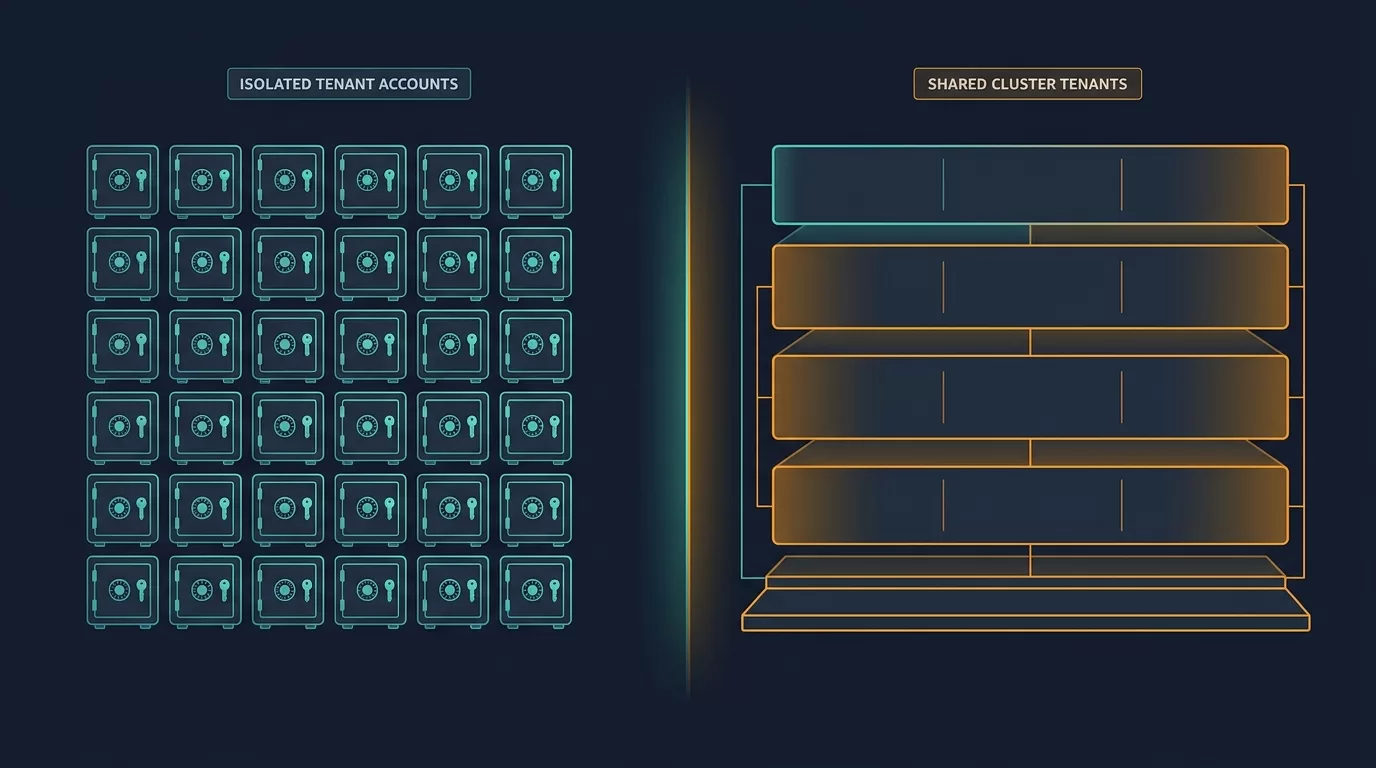

Choosing the right AWS multi-tenant isolation best practices is the most consequential architecture decision you will make when building a SaaS product. Get it wrong and you will spend years retrofitting a decision made on day two. This guide compares the two dominant models — account-per-tenant and shared cluster isolation on Amazon EKS — so you can choose deliberately, with full awareness of the compliance, cost, and operational tradeoffs.
TL;DR: Account-per-tenant gives you the strongest blast radius containment and compliance posture, but shared cluster isolation (especially on Amazon EKS) is cheaper to run and faster to ship. The right answer depends on your compliance requirements, deal size, and engineering maturity. This guide breaks it all down.
Table of Contents
- Why Tenant Isolation Is Your Most Consequential Architecture Decision
- The Two Primary Models: A Plain-English Overview
- Account-per-Tenant: Deep Dive
- Shared Cluster Isolation on Amazon EKS: Deep Dive
- AWS Multi-Tenant Isolation Best Practices: The Decision Framework
- Amazon EKS Tenant Routing: How to Wire It Correctly
- Hybrid Architectures: Getting the Best of Both Worlds
- Compliance Considerations: SOC 2, HIPAA, and FedRAMP
- Cost Modeling: What Each Model Really Costs
- Migration Path: Moving from Shared to Account-per-Tenant
- Common Mistakes SaaS Teams Make
- Frequently Asked Questions
- Conclusion
1. Why Tenant Isolation Is Your Most Consequential Architecture Decision
If you are building a SaaS product on AWS, you will face a fork in the road early — sometimes before you have your first paying customer. How do you isolate your tenants from each other?
This is not just an engineering question. It determines:
- Which enterprise deals you can close — SOC 2 Type II, HIPAA, FedRAMP, and ISO 27001 auditors will ask about it directly
- Your AWS bill — account-per-tenant can balloon costs; shared clusters can too if you over-provision
- Your operational complexity — deploying to 500 separate AWS accounts is a different life than deploying to one shared EKS cluster
- Your blast radius — if one tenant’s workload goes rogue, does it affect others?
The architectural decision you make in month two will still be with you in year five.
Related reading: How to design a SaaS control plane on AWS · AWS Landing Zone design for SaaS teams
2. The Two Primary Models: A Plain-English Overview
Model A: Account-per-Tenant (the “Silo Model”)
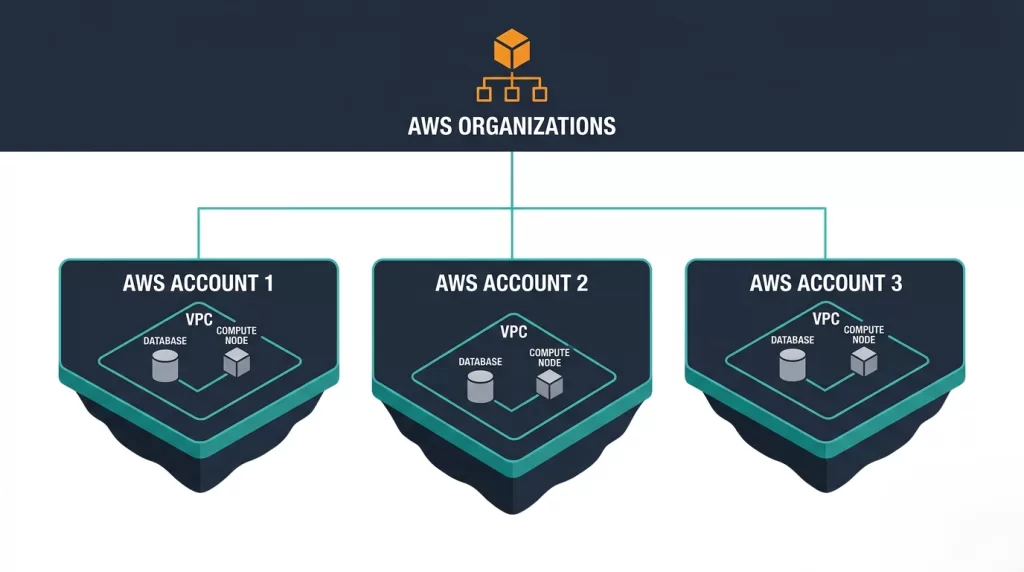
Each customer gets their own AWS account. You use AWS Organizations to manage the fleet. All of the tenant’s resources — compute, storage, networking, IAM — live inside that account and nowhere else.
Think of it like: renting each tenant their own apartment building. They share none of the infrastructure with anyone else.
Model B: Shared Cluster Isolation (the “Pool Model”)
All tenants run on shared infrastructure. On the compute side, this typically means Amazon EKS with namespace-level or network policy-level isolation. Data isolation is enforced at the application layer — usually through row-level security in RDS/Aurora or tenant-aware queries against DynamoDB.
Think of it like: a luxury apartment building with a shared lobby but locked individual units. The structure is shared; private spaces are enforced by locks (policies, not physical walls).
A Third Hybrid Model
Many mature SaaS companies end up here: a shared pool for SMB/self-serve customers and dedicated accounts (or dedicated clusters) for enterprise/regulated customers. We cover this in the Hybrid Architectures section.
3. Account-per-Tenant: Deep Dive
How It Works
When a new tenant signs up (or is provisioned by your sales team), your control plane:
- Creates a new AWS account via
organizations:CreateAccountor AWS Control Tower Account Factory - Applies a baseline Service Control Policy (SCP) to restrict what can be deployed in that account
- Deploys your tenant stack via AWS CloudFormation StackSets or a CI/CD pipeline targeting that account’s role
- Configures cross-account IAM roles so your control plane can monitor and manage the tenant account
- Routes the tenant’s subdomain (e.g.,
acme.yourproduct.com) to resources inside their account
Strengths of Account-per-Tenant
Hard blast radius containment. An AWS account is a genuine security boundary. A runaway Lambda, a crypto-miner that somehow got onto an EC2 instance, an accidental DROP TABLE — none of these can propagate to another tenant’s account. The account boundary is enforced by AWS’s own IAM and resource isolation, not your code.
Clean compliance story. When an enterprise customer asks “can you prove my data never touches another customer’s infrastructure?”, account-per-tenant lets you answer yes unambiguously. Each account has its own VPC, its own S3 buckets, its own RDS instance. There is no shared data plane.
Independent service limits. AWS service quotas apply per-account. A high-volume tenant will not exhaust your Lambda concurrency limit and cause issues for other tenants.
Auditability. CloudTrail, Config, and Security Hub data is siloed per account. You can give a tenant’s security team read access to their own CloudTrail without exposing anything about other tenants.
AWS Marketplace and billing. You can pass through AWS costs to tenants more cleanly using consolidated billing, and some enterprise buyers want their own AWS account for charge-back purposes.
Weaknesses of Account-per-Tenant
Operational complexity scales with tenant count. Managing 10 accounts is fine. Managing 500 accounts requires serious investment in automation — AWS Control Tower, Landing Zone Accelerator, or a custom account vending machine. Patching a shared dependency means rolling it out to every account.
Slow onboarding. AWS account creation is not instantaneous. Depending on your automation, provisioning a new account can take 10–30 minutes. This is a poor fit for self-serve, freemium, or trial-heavy GTM motions.
Higher base cost. Even a lightly-used tenant account has a floor cost. Multiply that by thousands of tenants and the economics can become unworkable.
Cross-account observability is harder. Aggregating logs, metrics, and traces from hundreds of accounts into a central observability platform requires explicit configuration.
When Account-per-Tenant Is the Right Call
- Your target market is mid-market or enterprise buyers with explicit data residency or isolation requirements
- You are selling into regulated verticals (healthcare, financial services, government)
- Your deal sizes justify the operational overhead (ACV > $50K–$100K is a rough rule of thumb)
- Your tenant count will stay in the hundreds, not the thousands
- You have or are building a DevOps/platform engineering function
4. Shared Cluster Isolation on Amazon EKS: Deep Dive
How It Works
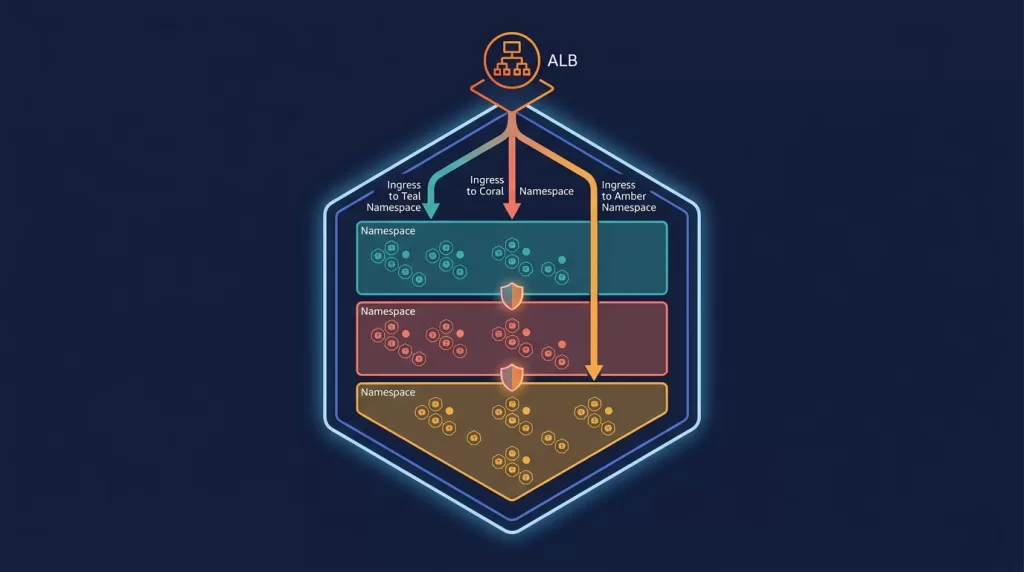
In the shared cluster model, all tenants share compute infrastructure — typically one or more Amazon EKS clusters. Isolation is enforced through a combination of:
- Kubernetes Namespaces — each tenant gets their own namespace
- Network Policies — restricting pod-to-pod communication across namespaces
- Resource Quotas — limiting how much CPU/memory a tenant’s namespace can consume
- RBAC — ensuring tenant-specific service accounts can only access their namespace
- Data-layer isolation — row-level security (RLS) in PostgreSQL/Aurora, or tenant-scoped partition keys in DynamoDB
Strengths of Shared Cluster Isolation
Fast onboarding. Creating a new namespace and applying a tenant config takes seconds. Self-serve flows become trivial to build.
Efficient resource utilization. Bin-packing across tenants means your node pool utilization is higher. You are not paying for idle capacity in hundreds of accounts.
Simpler operations at scale. You deploy once, not to N accounts. Upgrading Kubernetes versions, patching nodes, rolling out new application versions — all of this happens against a single cluster.
Lower minimum viable tenant cost. A new tenant with no load consumes almost nothing. You can run freemium and trial tiers economically.
Easier observability. All your metrics, logs, and traces come from the same cluster. One Prometheus/Grafana or Datadog deployment covers all tenants.
Weaknesses of Shared Cluster Isolation
Noisy neighbor risk. Even with resource quotas, a misbehaving tenant can cause issues — excessive API server requests, DNS flood, or filling up shared ephemeral storage.
Softer security boundary. The isolation is policy-enforced by your code and Kubernetes configuration, not by AWS’s own account boundary. A misconfigured NetworkPolicy or an RBAC mistake could expose one tenant’s data to another.
Container escape risk. A kernel exploit or container breakout (rare, but real) could potentially allow a tenant to reach other tenants’ pods in the same cluster. Account isolation stops this by definition.
Compliance friction. Some compliance frameworks and enterprise security teams will push back on shared infrastructure. You will spend time in security questionnaires explaining your isolation model.
When Shared Cluster Isolation Is the Right Call
- You are building a high-volume, self-serve, or PLG (product-led growth) SaaS
- Your customers are SMB or developer-focused and have no strict isolation requirements
- Your tenant count is in the thousands or tens of thousands
- Cost efficiency is a primary constraint
- Your team has Kubernetes expertise
5. AWS Multi-Tenant Isolation Best Practices: The Decision Framework
Use this framework to determine which model fits your situation. These are the AWS multi-tenant isolation best practices distilled from real SaaS production environments.
Step 1: Identify Your Compliance Floor
Ask your largest current or target customers what they require:
| Requirement | Implication |
|---|---|
| FedRAMP Moderate/High | Account-per-tenant almost certainly required |
| HIPAA BAA | Possible with shared cluster + strong controls; account-per-tenant is cleaner |
| SOC 2 Type II | Both models can achieve this |
| ISO 27001 | Both models can achieve this |
| Data residency (EU, specific regions) | Account-per-tenant simplifies this significantly |
| No shared infrastructure clause | Account-per-tenant required |
Step 2: Model Your Tenant Economics
Calculate your cost floor per tenant in each model. If account-per-tenant costs $200/month per tenant at minimum and your median customer pays $500/month, you are spending 40% of revenue on infrastructure — likely unsustainable.
Step 3: Consider Your GTM Motion
- Self-serve / PLG / freemium → Shared cluster is almost always the right starting point
- Sales-led / enterprise → Account-per-tenant is worth the investment
- Mixed → You are heading toward a hybrid model
Step 4: Assess Engineering Capacity
Account-per-tenant requires an account vending machine, StackSets or CDK Pipelines for multi-account deployments, and cross-account observability tooling. Shared cluster requires solid Kubernetes expertise. Neither is free.
Decision Matrix
| Factor | Account-per-Tenant | Shared Cluster (EKS) |
|---|---|---|
| Blast radius containment | ★★★★★ | ★★★☆☆ |
| Compliance simplicity | ★★★★★ | ★★★☆☆ |
| Onboarding speed | ★★☆☆☆ | ★★★★★ |
| Cost efficiency at scale | ★★☆☆☆ | ★★★★★ |
| Operational simplicity | ★★☆☆☆ | ★★★★☆ |
| Observability ease | ★★★☆☆ | ★★★★★ |
| Security audit story | ★★★★★ | ★★★☆☆ |
6. Amazon EKS Tenant Routing: How to Wire It Correctly
If you choose the shared cluster path, getting Amazon EKS tenant routing right is critical. Here is the architecture pattern used by mature SaaS teams.
Layer 1: Ingress Routing
Use the AWS Load Balancer Controller with an Application Load Balancer (ALB) as your ingress. Route by hostname:
yaml
# tenant-ingress.yaml
apiVersion: networking.k8s.io/v1
kind: Ingress
metadata:
  name: tenant-acme-ingress
  namespace: tenant-acme
  annotations:
    kubernetes.io/ingress.class: alb
    alb.ingress.kubernetes.io/scheme: internet-facing
    alb.ingress.kubernetes.io/target-type: ip
spec:
  rules:
    - host: acme.yourproduct.com
      http:
        paths:
          - path: /
            pathType: Prefix
            backend:
              service:
                name: app-service
                port:
                  number: 80
For large tenant counts, use a wildcard certificate on ACM (*.yourproduct.com) and a single ALB with host-based routing rules to avoid the overhead of one ALB per tenant.
Layer 2: Namespace Isolation
Each tenant gets a dedicated namespace. Apply a standard set of resources at namespace creation time using a Helm chart or Kustomize overlay:
yaml
# Standard resources applied per tenant namespace
- ResourceQuota         # CPU/memory limits
- LimitRange            # Default container limits
- NetworkPolicy         # Deny cross-namespace traffic
- ServiceAccount        # Tenant-scoped identity
- RoleBinding           # Minimum necessary RBAC
Layer 3: Network Policies
This is where most teams make mistakes. The default Kubernetes behavior allows all pod-to-pod communication. You need to explicitly deny cross-namespace traffic:
yaml
# deny-cross-namespace.yaml — apply to every tenant namespace
apiVersion: networking.k8s.io/v1
kind: NetworkPolicy
metadata:
  name: deny-cross-namespace
  namespace: tenant-acme
spec:
  podSelector: {}
  policyTypes:
    - Ingress
    - Egress
  ingress:
    - from:
        - podSelector: {}          # Allow from same namespace
  egress:
    - to:
        - podSelector: {}          # Allow to same namespace
    - ports:
        - port: 53                 # Allow DNS
          protocol: UDP
    - to:
        - namespaceSelector:
            matchLabels:
              kubernetes.io/metadata.name: shared-services
Important: NetworkPolicy enforcement requires a CNI plugin that supports it. The default VPC CNI for EKS does not enforce NetworkPolicies. Use Calico, Cilium, or enable the Network Policy Controller add-on (available in EKS 1.25+).
Layer 4: Data Isolation
Compute isolation is only half the picture. Your data layer needs to enforce isolation too.
Option A: Separate schemas per tenant (PostgreSQL/Aurora)
sql
CREATE SCHEMA tenant_acme;
SET search_path TO tenant_acme, public;
Option B: Row-level security (PostgreSQL/Aurora)
sql
ALTER TABLE orders ENABLE ROW LEVEL SECURITY;

CREATE POLICY tenant_isolation ON orders
  USING (tenant_id = current_setting('app.current_tenant_id')::uuid);
Option C: Tenant-prefixed partition keys (DynamoDB)
PK: TENANT#acme#ORDER#12345
SK: 2024-01-15T10:30:00Z
Layer 5: IAM and IRSA
Use IAM Roles for Service Accounts (IRSA) to give each tenant’s pods access only to the AWS resources belonging to that tenant. This prevents a compromised pod from accessing another tenant’s S3 bucket or secrets.
yaml
apiVersion: v1
kind: ServiceAccount
metadata:
  name: app-service-account
  namespace: tenant-acme
  annotations:
    eks.amazonaws.com/role-arn: arn:aws:iam::123456789012:role/tenant-acme-app-role
7. Hybrid Architectures: Getting the Best of Both Worlds
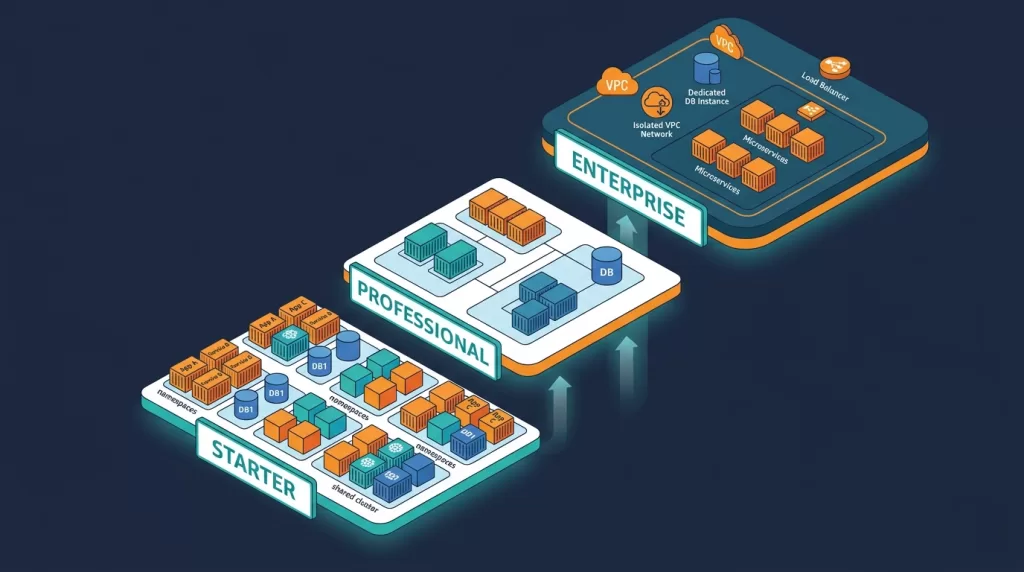
The reality of mature SaaS companies is that most of them use a hybrid model — shared infrastructure for lower-tier customers and dedicated infrastructure for enterprise customers.
The Tiered Isolation Pattern
Free / Starter Tier     → Shared EKS cluster, shared RDS (with RLS)
Professional Tier       → Dedicated EKS namespace, dedicated RDS instance (same account)
Enterprise Tier         → Dedicated AWS account, dedicated EKS cluster, dedicated RDS
This lets you serve self-serve and SMB customers cost-efficiently while closing enterprise deals that require account-level isolation. You can charge a meaningful premium for dedicated infrastructure that more than covers the cost.
Implementation Approach
Your control plane needs to understand tenant tier and route provisioning accordingly. A useful abstraction is a Tenant Profile object:
json
{
  "tenant_id": "acme",
  "tier": "enterprise",
  "isolation_model": "account-per-tenant",
  "aws_account_id": "123456789012",
  "region": "us-east-1",
  "compliance_requirements": ["SOC2", "HIPAA"]
}
Your provisioning logic branches based on isolation_model. The same application code deploys to both models — only the infrastructure targeting logic differs.
AWS Control Tower for the Account Fleet
If you go hybrid or account-per-tenant, AWS Control Tower is the foundation:
- Account Factory automates account creation with pre-applied guardrails
- Service Control Policies (SCPs) enforce baseline security across all tenant accounts
- AWS Config Rules provide continuous compliance monitoring
- AWS Security Hub aggregates findings across all accounts into your central security account
Pair Control Tower with Account Factory for Terraform (AFT) or the Landing Zone Accelerator on AWS for heavy customization.
8. Compliance Considerations: SOC 2, HIPAA, and FedRAMP
SOC 2 Type II
Both models can achieve SOC 2 Type II certification. The shared cluster model requires you to demonstrate logical access controls preventing cross-tenant data access, network segmentation via NetworkPolicies, and monitoring for anomalous cross-tenant activity. The account-per-tenant model simplifies the data segregation narrative but adds complexity around account management controls.
HIPAA
HIPAA’s Security Rule requires technical safeguards to protect ePHI. A shared cluster can comply, but you will need to document isolation controls carefully. Key requirements for either model:
- Encrypt all data at rest (EBS, RDS, S3)
- Encrypt all data in transit with TLS
- Implement audit logging via CloudTrail and application logs
- Ensure access to ePHI is scoped to the correct tenant at every layer
Many healthcare enterprise buyers will still require account-per-tenant even if the shared model is technically HIPAA-compliant, because their internal security teams demand it.
FedRAMP
FedRAMP Moderate and High authorizations typically require infrastructure-level data isolation, continuous monitoring (ConMon) capabilities, and US-only data residency. If FedRAMP is a requirement, account-per-tenant in us-gov-west-1 or us-gov-east-1 is almost certainly your path. Consult with a FedRAMP 3PAO before making architectural commitments.
9. Cost Modeling: What Each Model Really Costs
Shared Cluster Baseline (50 tenants)
| Resource | Monthly Cost (approx.) |
|---|---|
| EKS cluster (3 × m5.xlarge nodes) | $450 |
| Aurora PostgreSQL (db.r6g.large, Multi-AZ) | $280 |
| ALB + data transfer | $80 |
| S3, CloudWatch, misc. | $100 |
| Total | ~$910/month (~$18/tenant) |
Account-per-Tenant Baseline (50 tenants)
| Resource | Per Tenant/Month | 50 Tenants/Month |
|---|---|---|
| ECS Fargate or small EKS node group | $60 | $3,000 |
| RDS (db.t3.medium) | $50 | $2,500 |
| VPC, NAT Gateway, misc. | $40 | $2,000 |
| Total | ~$150 | ~$7,500/month |
The shared cluster is roughly 8× cheaper per tenant at this scale. However, if account-per-tenant allows you to close one additional $100K enterprise deal per year that a shared cluster would have blocked, the math almost always favors the investment.
10. Migration Path: Moving from Shared to Account-per-Tenant
Many teams start with a shared cluster and need to move specific customers to dedicated accounts as they grow upmarket. Here is a proven migration pattern.
Phase 1: Build Your Account Vending Machine (2–4 weeks)
Minimum viable tooling:
- AWS Control Tower Account Factory (or AFT for Terraform users)
- A CI/CD pipeline that can deploy your application stack to a new account via cross-account roles
- A DNS automation step (Route 53 hosted zone + ALB in the new account)
Phase 2: Dual-Mode Control Plane (2–4 weeks)
Update your control plane to understand two deployment modes. Add an isolation_model field to your tenant record and branch your provisioning pipeline accordingly. Your application code does not change — only the infrastructure targeting logic does.
Phase 3: Migrate the First Customer (1–2 weeks)
- Provision the new account and deploy a fresh stack
- Migrate data — export from shared RDS, import to dedicated RDS (AWS Database Migration Service works well here)
- Validate the customer on the new stack in a maintenance window
- Update DNS to point to the new account’s ALB
- Decommission the tenant’s resources from the shared cluster
Phase 4: Productize the Migration
Once you have done it once, document the runbook, automate the data migration, and create a sales-assisted upgrade flow. This becomes a revenue-generating “Dedicated Infrastructure” tier.
11. Common Mistakes SaaS Teams Make
Mistake 1: Deferring the isolation decision entirely
“We will worry about that when we have enterprise customers” is how teams end up with a costly, disruptive retrofit at exactly the wrong time — when a big prospect finally requires it.
Fix: Make an explicit, documented decision early. Even if you choose shared cluster today, design your control plane with the isolation model as a first-class concept so you can extend it later.
Mistake 2: Assuming Kubernetes namespaces are a security boundary
They are an organizational boundary, not a security boundary. Without NetworkPolicies, RBAC enforcement, and a CNI that enforces policies, pods in different namespaces can talk to each other freely.
Fix: Treat every tenant namespace as if it could be hostile. Apply default-deny NetworkPolicies from day one.
Mistake 3: Forgetting the data plane
Teams invest heavily in compute isolation (separate EKS namespaces, separate accounts) and then connect all tenants to the same RDS instance without row-level security or schema separation.
Fix: Your isolation model must cover compute and data simultaneously.
Mistake 4: Building an account vending machine from scratch
This is a 3–6 month engineering project if done entirely custom.
Fix: Use AWS Control Tower and AFT, or the Landing Zone Accelerator. These are battle-tested starting points. Customize from a solid baseline rather than from zero.
Mistake 5: No cross-account observability strategy
You build 200 tenant accounts and realize you have no way to see aggregate error rates, no central place for security findings, and no easy way to answer “which accounts have this misconfiguration?”
Fix: Design your observability architecture for multi-account from day one. AWS Security Hub, CloudTrail Lake, Amazon Managed Grafana, and Datadog all support cross-account aggregation.
12. Frequently Asked Questions
What is the difference between account-per-tenant and account-per-environment?
Account-per-environment means separate AWS accounts for dev, staging, and production of your own application. Account-per-tenant means each customer gets their own account. These are complementary patterns — you can and often should have both.
Can I use Amazon EKS in an account-per-tenant model?
Yes. Account-per-tenant and EKS are not mutually exclusive. You can run an EKS cluster inside each tenant account. Some teams use ECS Fargate per-tenant account instead to reduce Kubernetes operational overhead.
Is Amazon EKS tenant routing hard to implement?
The core mechanics (namespaces, ingress by hostname) are straightforward. The hard part is operational consistency — ensuring every tenant namespace gets the same NetworkPolicies, ResourceQuotas, RBAC bindings, and monitoring config. Automate this with a Helm chart or Operator from day one.
How does AWS SaaS Factory fit into this?
AWS SaaS Factory is a team within AWS providing reference architectures, code samples, and advisory support specifically for SaaS builders. Their GitHub repository (aws-samples/aws-saas-factory-*) has reference implementations for both silo and pool models and is a strong starting point.
What about serverless multi-tenancy?
Lambda-based SaaS architectures typically use the shared pool model at the function level, scoping execution context to a tenant via environment variables or JWT claims. For stronger isolation, you can deploy Lambda functions into per-tenant accounts. The tradeoffs mirror those of the EKS models described here.
How do I pass tenant context through my request pipeline?
Set tenant context at the edge (API Gateway, ALB, or ingress controller) by resolving the tenant from the request hostname or a JWT claim, then propagate it through your service mesh as a header (e.g., X-Tenant-ID). Never trust tenant ID from client request bodies — always derive it from the authenticated identity or the hostname.
What AWS services help with multi-account SaaS management?
- AWS Organizations — hierarchy and policy management
- AWS Control Tower — automated account provisioning and guardrails
- AWS Service Catalog — standardized product catalogs for per-tenant deployments
- AWS CloudFormation StackSets — deploy stacks to multiple accounts simultaneously
- AWS Security Hub — aggregate security findings across all accounts
- AWS CloudTrail Lake — centralized audit log querying
- Amazon EventBridge — cross-account event routing
13. Conclusion
There is no universally correct answer to the account-per-tenant vs. shared cluster debate. What there is:
Account-per-tenant is the right choice when compliance requirements are strict, deal sizes are large, and tenant count is manageable. It is expensive to operate but closes enterprise deals and eliminates entire categories of security risk.
Shared cluster isolation on Amazon EKS is the right choice when you are building high-volume, self-serve SaaS, when cost efficiency is critical, and when customers do not require hard infrastructure isolation. Done correctly — with proper NetworkPolicies, RBAC, IRSA, and data-layer isolation — it is a robust and scalable architecture.
Hybrid models are where serious SaaS companies end up. They let you serve the full customer spectrum without forcing a one-size-fits-all infrastructure decision.
Whatever you choose, make the decision deliberately. Document it. Build your control plane with the isolation model as a first-class concept. And design your migration path before you need it — because if you are successful, you will need it.
Related reading: How to design a SaaS control plane on AWS · AWS EKS cost optimization guide · SOC 2 compliance on AWS: a practical checklist