
AWS Lambda MicroVMs: The Complete Guide to Isolated Sandboxes for AI and User-Generated Code
Palash Upadhyay
June 24, 2026
If you have spent any time building a product that runs code you didn’t write, you know the problem well. Maybe it’s an AI coding assistant. Maybe it’s a notebook platform, a CI/CD runner, or a game server executing player scripts. In every case, you face the same uncomfortable choice. Isolate hard, and accept slow startup. Launch fast, and accept a shared kernel. Or build your own virtualization layer, and quietly turn your product team into a platform engineering team.
On June 22, 2026, AWS removed that choice. AWS Lambda MicroVMs is a new serverless compute primitive built on Firecracker. It gives every user or AI session its own isolated virtual machine. Each one launches in a near-instant resume from a snapshot. Each one holds onto memory and disk state for up to eight hours. And none of it requires you to manage infrastructure, because there isn’t any to manage.
This guide covers what AWS Lambda MicroVMs actually are, how they work under the hood, and how they compare to alternatives like gVisor and Kata Containers. If you’re evaluating sandboxed compute for AI agents, multi-tenant SaaS, or developer tooling, this is the primer to bookmark.
What Are AWS Lambda MicroVMs?
AWS Lambda MicroVMs are a new resource type inside AWS Lambda, distinct from Lambda Functions. They’re purpose-built to run code generated by end users or AI in an isolated, stateful execution environment. Each MicroVM is a dedicated Firecracker virtual machine. It has its own kernel, its own memory, and its own disk. Nothing is shared with any other tenant.
That single design decision solves a problem that has quietly shaped multi-tenant application architecture for years. Three categories of compute already existed, and each one forced a tradeoff:
- Traditional virtual machines give you a hardware-enforced security boundary, but they take minutes to boot. Nobody wants to wait two minutes for a coding sandbox to spin up.
- Containers start in seconds, but they share the host kernel. A kernel-level escape in one tenant’s container can, in principle, reach every other tenant on that host. Locking that down takes serious security engineering.
- Functions as a service excel at short, event-driven, stateless work. They were never designed to hold a session’s state open for an hour while a user steps away.
AWS Lambda MicroVMs sits in the gap those three leave open. It delivers VM-grade isolation, container-grade speed, and the state retention that interactive sessions actually need. You don’t have to operate any of the virtualization stack yourself.
Why This Launch Matters Right Now
The timing isn’t incidental. A specific category of application has exploded over the last two years. All of it needs the same primitive: a private, disposable compute environment per user or per AI agent session.
- AI coding assistants and agentic IDEs that execute the code a model just wrote, often without a human reviewing it first.
- Interactive notebooks and data analytics platforms, where a user’s uploaded script needs to run against their own data only.
- CI/CD pipelines that build and test pull requests from external contributors, including dependencies nobody has fully vetted.
- Vulnerability scanners that deliberately execute potentially malicious payloads to observe what they do.
- Game servers and platforms that run user-submitted mods, scripts, or bots.
In every one of these cases, the platform’s own engineers didn’t write the code. So the platform can’t fully trust it. That’s precisely the threat model AWS designed Lambda MicroVMs to address. It’s also exactly the threat model AI-generated code introduces at scale. A language model writing and immediately executing code looks, from a security standpoint, just like an anonymous user submitting a script. You have to assume it can be wrong. Sometimes you have to assume it can be adversarial.
How AWS Lambda MicroVMs Work
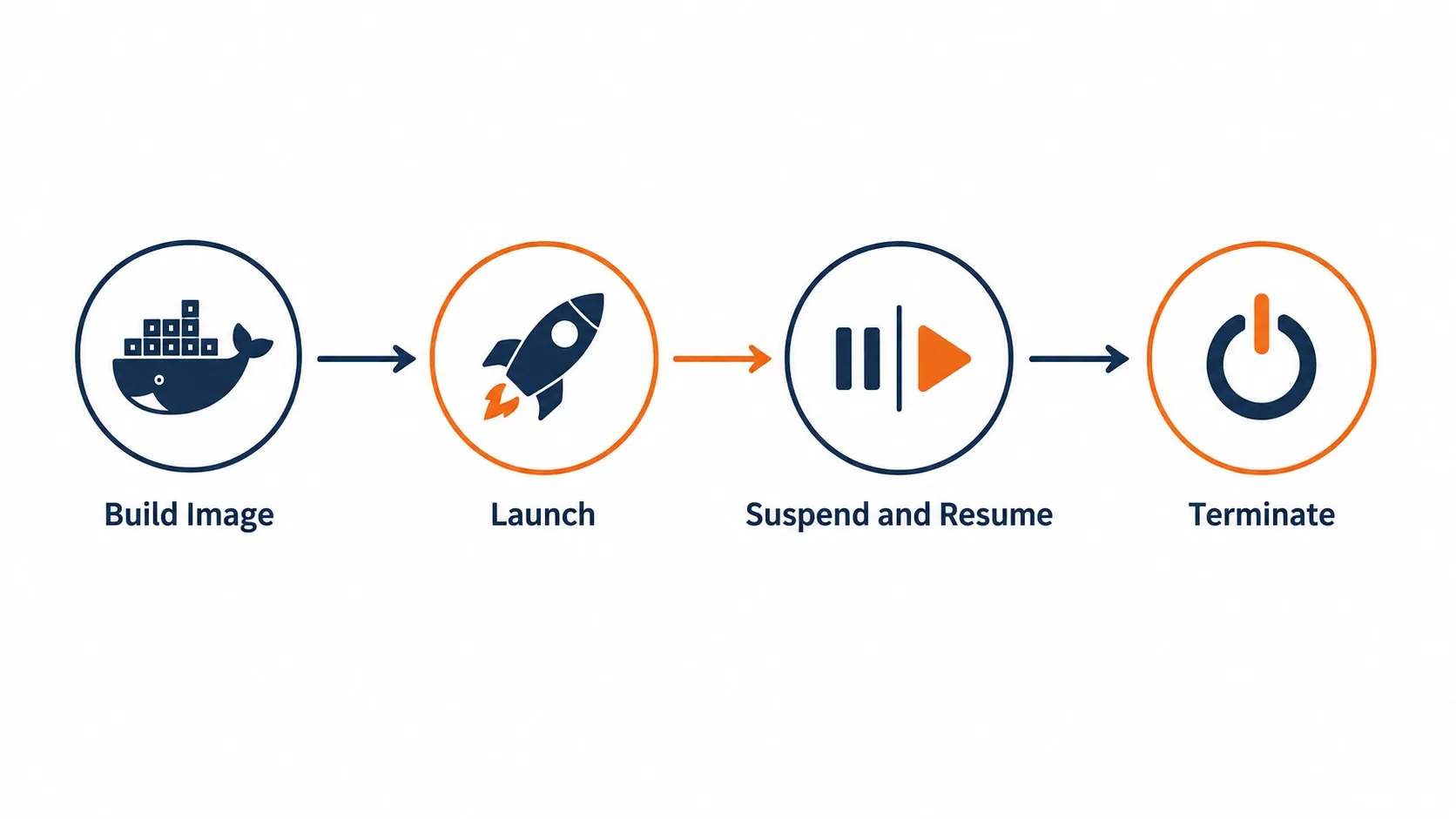
The architecture follows an “image, then launch” model. It’s conceptually close to how containers work, but the unit of execution is a hardware-isolated VM instead of a process.
1. Build a MicroVM Image
You package your application code and a Dockerfile into a zip archive and upload it to Amazon S3. The Dockerfile starts from an AWS-provided base image, such as an Amazon Linux 2023 minimal image built for MicroVMs, and installs whatever your application needs.
bash
aws lambda-microvms create-microvm-image \ --code-artifact uri=<path/to/s3/artifact.zip> --name <VM_image_name> \ --base-image-arn arn:aws:lambda:us-east-1:aws:microvm-image:al2023-1 \ --build-role-arn <IAM role ARN>Lambda retrieves the zip, executes your Dockerfile, and starts your application. Then it takes a Firecracker snapshot of the running environment’s full memory and disk state. Build logs stream live to Amazon CloudWatch. Once the image is ready, it appears with an ARN and a version number, either in the console or via the CLI.
This step is what makes everything afterward fast. You aren’t starting your application from cold every time. You’re capturing it already running, then reusing that exact state.
2. Launch a MicroVM From the Image
bash
aws lambda-microvms run-microvm \ --image-identifier arn:aws:lambda:<region>:<acct>:microvm-image:my-image \ --execution-role-arn arn:aws:iam::<acct>:role/MicroVMExecutionRole \ --idle-policy '{"maxIdleDurationSeconds":900,"suspendedDurationSeconds":300,"autoResumeEnabled":true}'Lambda assigns the MicroVM a unique ID and a dedicated HTTPS endpoint. Because it resumes from a pre-initialized snapshot rather than booting cold, the application is already running by the time the call returns. There’s no waiting for it to initialize. There’s no load balancer to configure, no ingress controller, and no networking setup on your part.
3. Connect, Use, Suspend, Resume
Clients talk to the MicroVM through its dedicated endpoint, authenticated with a short-lived token attached via an X-aws-proxy-auth header. While the session is active, the application behaves exactly as it would on any server.
Once the session goes idle past your configured threshold, Lambda suspends the MicroVM automatically. It snapshots memory and disk state at that point. The next request triggers an automatic resume, and from the client’s side, the pause is invisible. Installed packages, loaded models, open files, and running background processes all come back exactly as they were left.
4. Terminate
When the session is genuinely over, you terminate the MicroVM and release the resources. Nothing is left running, and nothing is left to pay for.
The Three Capabilities That Make This Different
AWS frames Lambda MicroVMs around three properties that, until now, no single AWS compute service offered together.
VM-level isolation. Each MicroVM is a Firecracker virtual machine with its own kernel. Nothing is shared between sessions, including resources. Code that escapes the application layer stays contained inside its own VM boundary. It can’t see or touch any other tenant’s environment, or the underlying host.
Rapid launch and resume. Every MicroVM starts from a pre-initialized snapshot rather than a cold boot. That means launches and idle-resumes both land at near-instant startup latency. AWS notes that even a multi-gigabyte interactive session comes back online fast enough to feel responsive to the end user.
Stateful execution. A running MicroVM holds onto memory, disk, and running processes for the length of a session, up to eight hours of total runtime. It can suspend automatically after a configurable idle window. That feature alone is the difference between “a function that runs for a few seconds” and “a workspace a user can leave open all afternoon.”
One detail worth flagging if you’re planning a build: MicroVMs launch from pre-initialized snapshots. So anything your application does at startup that generates unique values, opens fresh network connections, or loads ephemeral data may need AWS’s service-provided initialization hooks. Otherwise it might only behave correctly once, at image-build time, and not again on resume.
AWS Lambda MicroVMs vs. Lambda Functions
It’s worth being precise here, because the naming invites confusion. Lambda MicroVMs is a new, separate resource inside AWS Lambda, with its own API surface. It isn’t a configuration option on an existing function.
| Lambda Functions | Lambda MicroVMs | |
|---|---|---|
| Best for | Event-driven, request-response workloads | Long-running, stateful, interactive sessions |
| Execution model | Stateless, ephemeral | Stateful, session-scoped, suspendable |
| Isolation | Firecracker-backed, optimized for short bursts | Dedicated Firecracker VM per session, full OS |
| Max duration | 15 minutes | Up to 8 hours per session |
| Typical use | APIs, data processing, event handlers | AI sandboxes, IDEs, CI/CD runners, analytics notebooks |
The two are designed to complement each other, not compete. An application’s event-driven backbone can keep running on Lambda Functions. The specific steps that need to execute untrusted user- or AI-generated code can call into Lambda MicroVMs for that isolated piece.
AWS Lambda MicroVMs vs. gVisor vs. Kata Containers
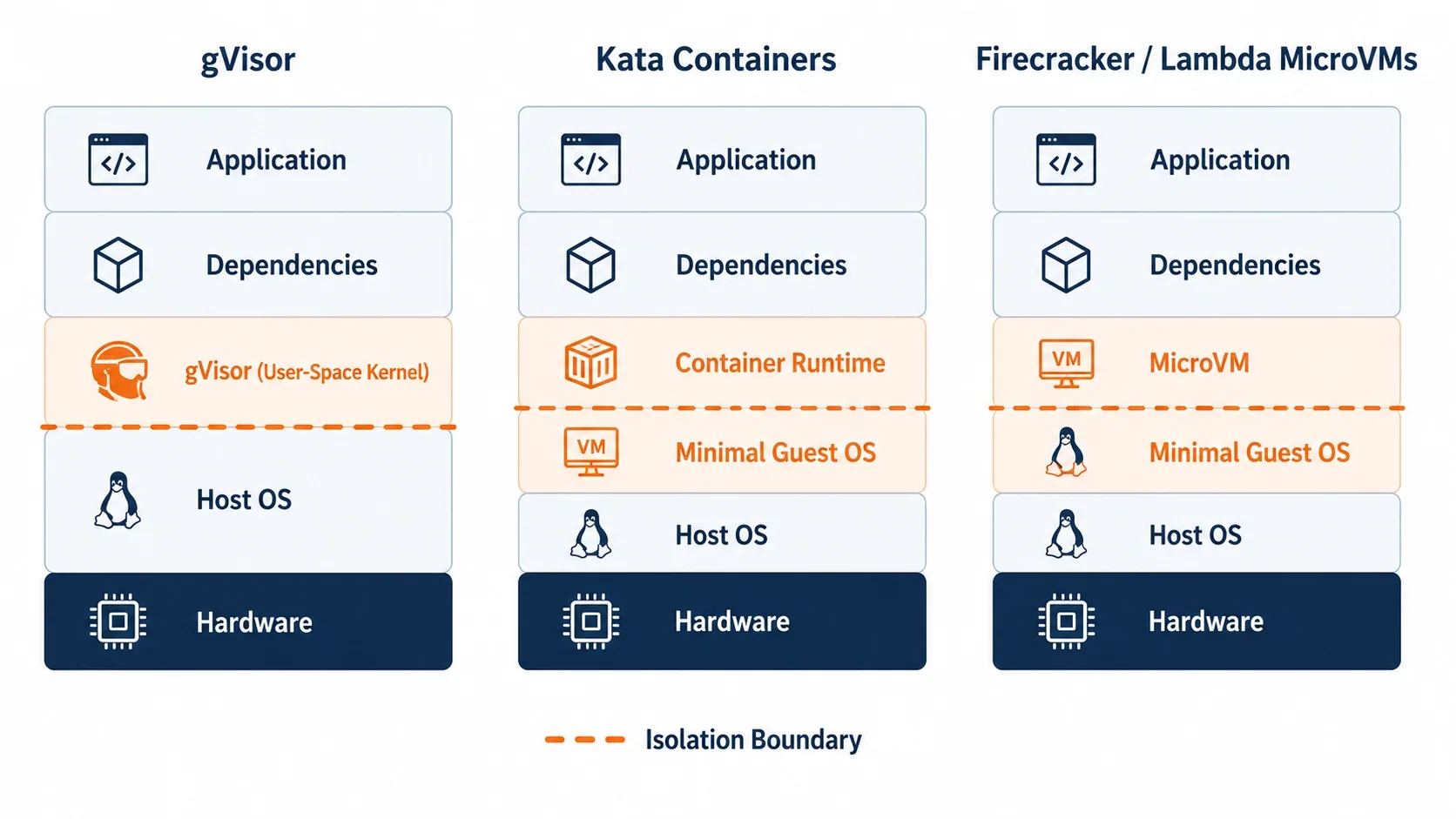
If you’ve researched sandboxing before, you’ve run into gVisor and Kata Containers. They solve an overlapping problem, but take different architectural approaches. The differences matter once real, adversarial code enters the picture.
gVisor intercepts application system calls in userspace through a component called Sentry. It re-implements a large subset of Linux syscalls in Go, rather than letting them reach the host kernel directly. This improves container security, but it doesn’t provide hardware-level isolation. It also adds measurable overhead on I/O-heavy workloads, since every syscall gets intercepted and proxied. gVisor is a strong fit for defense-in-depth on top of standard container workflows. But a process-level compromise is still a process-level compromise. There’s no VM boundary underneath it.
Kata Containers isn’t itself an isolation technology. It’s an orchestration layer that runs standard container images inside lightweight VMs, using Firecracker, Cloud Hypervisor, or QEMU as the backend. You get hardware-level isolation while keeping a familiar container workflow and Kubernetes integration. Kata abstracts away the operational complexity of running these VMMs in production, things like kernel images, networking, storage, and lifecycle management. That’s exactly the work AWS has now absorbed natively into Lambda MicroVMs for AWS-hosted workloads.
Firecracker is the VMM underneath both Kata’s VM backend option and Lambda MicroVMs itself. Used directly, it gives you hardware-enforced isolation, with each workload running its own dedicated kernel, fully separated from the host and other workloads. But as a bare VMM, it requires you to build your own image management, networking, and lifecycle orchestration. That’s exactly the engineering tax AWS just made optional.
So where does Lambda MicroVMs sit? Think of it as Firecracker, pre-wired with the orchestration Kata exists to provide, delivered as a managed AWS service with no cluster to run. If your workload already runs on AWS and you want VM-grade isolation without owning a Kata or raw-Firecracker control plane, Lambda MicroVMs collapses several infrastructure decisions into one API call. If you’re running on Kubernetes, multi-cloud, or need GPU passthrough patterns Lambda MicroVMs doesn’t yet support, Kata or gVisor remain the right tools.
AWS Lambda MicroVMs vs. Dedicated AI Sandbox Platforms
A wave of startups, including E2B and Daytona, built businesses specifically around giving AI agents disposable sandboxes. Many of them run on Firecracker themselves. That tells you the underlying technology choice was never really in question. The differentiation has always been in the developer experience layered on top of it.
What Lambda MicroVMs changes is who can build that experience, without first building a Firecracker control plane. If you were previously choosing a third-party sandbox vendor purely because operating Firecracker yourself looked like a multi-quarter engineering project, that calculus shifts now. You can reach for the same primitive natively, inside the AWS account your application already lives in. Same IAM, same VPC, same billing, same observability stack. No new vendor, and no new trust boundary, added to your architecture.
That doesn’t make dedicated sandbox platforms irrelevant, though. Many of them offer SDKs, language-specific ergonomics, and pre-built integrations, like browser automation or specific agent frameworks, that a raw AWS primitive doesn’t. But for teams already committed to AWS, the build-vs-buy conversation just got a serious new option on the “build” side.

Real-World Use Cases for AWS Lambda MicroVMs
AI code execution sandboxes. This is the headline use case. When an AI coding assistant generates code and needs to run it, whether to test it, execute a user’s request, or validate output, that code runs in a MicroVM. It has no access to the agent’s own credentials or memory, and no shared state with any other user’s session.
Interactive development environments. Cloud IDEs and notebook platforms where a user writes and runs code over an extended session. They switch away, then come back expecting their environment exactly as they left it: installed packages, running processes, open files, all included.
Multi-tenant CI/CD. Build and test runners that need a clean, isolated environment per job. This matters most when pipelines execute code from external pull requests or third-party dependencies nobody has vetted.
Security and vulnerability scanning. Tools that need to actually execute a suspicious binary or script to observe its behavior. That work is, by definition, unsafe to run anywhere near production infrastructure or other customers’ data.
Data analytics and Jupyter-style platforms. Long-running analytical sessions against a user’s own dataset. The application needs to retain loaded dataframes and intermediate results across an hour or more of exploratory work.
Reinforcement learning and agent evaluation. Fresh, identical, isolated environments spun up per training run or evaluation episode. Results stay clean, since no state leaks between runs.
Game servers running user-supplied scripts. Platforms that let players upload mods, bots, or custom logic, where the operator can’t vouch for what that code actually does.
Availability, Specs, and Pricing
AWS Lambda MicroVMs is available today in US East (N. Virginia), US East (Ohio), US West (Oregon), Europe (Ireland), and Asia Pacific (Tokyo). It runs on ARM64 (Graviton) architecture. Each MicroVM can scale up to 16 vCPUs, 32 GB of memory, and 32 GB of disk.
A few specifics worth noting before you architect around this:
- You provision each MicroVM for baseline or average usage. There’s flexibility to vertically scale up to 4x your configured baseline during peak activity. You pay the baseline rate while running, and pay extra only for active use above that baseline.
- Idle MicroVMs can be suspended explicitly, through an API call, or automatically, through a lifecycle policy. This is the main lever for controlling cost on sessions with unpredictable idle time.
- Networking is flexible on both sides. Inbound traffic uses configurable HTTPS ports with service-provided JWE-based authentication. Outbound access can reach either the public internet or your own VPC.
For exact rates, check the AWS Lambda pricing page directly. AWS publishes MicroVM-specific pricing there, not in the launch announcement, and rates can vary by region and configuration. As a rule of thumb across the broader Lambda family, ARM64/Graviton pricing tends to run lower than equivalent x86 pricing. Committing to predictable usage through a Compute Savings Plan can also reduce steady-state costs meaningfully. That’s worth modeling early if you expect MicroVMs to run continuously, rather than in short bursts.
Should You Use AWS Lambda MicroVMs? A Quick Decision Framework
Reach for Lambda MicroVMs when most of the following are true:
- You’re executing code you didn’t write and can’t fully trust, whether it’s user-submitted, AI-generated, or third-party.
- Sessions need to persist state, like installed packages, in-memory data, or running processes, for minutes to hours, not milliseconds to seconds.
- You’re already building on AWS and would rather not introduce a new vendor or operate your own virtualization control plane.
- You need genuine VM-level isolation, not just process-level sandboxing, because the cost of a successful escape is unacceptable.
Stick with standard Lambda Functions, containers, or gVisor-based isolation when:
- Your workload is short-lived, stateless, and event-driven. That’s the classic Lambda Function sweet spot.
- You need Kubernetes-native portability across clouds, or on-prem, where an AWS-specific primitive doesn’t fit your deployment model.
- You need x86 architecture, GPU passthrough, or regions Lambda MicroVMs doesn’t yet support. Check current regional and architecture availability before committing, since this is a brand-new service still expanding its footprint.
Getting Started
To try AWS Lambda MicroVMs yourself, start in the AWS Lambda console. MicroVMs now appears as its own item in the left-hand navigation. From there:
- Package a small test application, a Flask or Express app works well for a first run, along with a Dockerfile into a zip file. Upload it to S3.
- Create your first MicroVM Image using
create-microvm-image, pointing at an AWS-provided base image. - Launch a MicroVM from that image with
run-microvm. Configure an idle policy to control automatic suspend and resume. - Send a request to the dedicated HTTPS endpoint you get back. Let it idle past your suspend threshold, then send another request and watch the application resume exactly where it left off.
For full API references and deeper architectural guidance, the Lambda MicroVMs Developer Guide is the authoritative source. It’s worth reading in full before you design anything that depends on suspend/resume behavior in production.
Final Thoughts
AWS Lambda MicroVMs is less a feature update than an acknowledgment of where serverless computing is heading. The applications defining this decade all need the same underlying primitive. AI agents that write and run their own code. Multi-tenant platforms that hand strangers a compute environment. Tools that have to safely execute things nobody trusts. Each one needs an isolated, stateful, disposable environment that someone else operates, so you don’t have to.
For years, getting that primitive meant accepting a security compromise, or building and running virtualization infrastructure yourself. AWS just closed that gap, using the same Firecracker technology that has quietly run trillions of Lambda invocations without most developers ever thinking about it. If your roadmap includes AI-generated code execution, interactive developer tooling, or any flavor of multi-tenant sandboxing, this service is worth prototyping against now. Not because it’s new, but because it removes a problem you were probably planning to solve yourself.
Uncategorized