Experiential learning
AI Cloudkida Chatbot
CloudKida, based in Ahmedabad, delivers experiential learning through cloud-based lab environments.

Case study
A platform to create, deliver and monitor hands-on labs, built multi-tenant from the start so each customer is isolated without running a separate stack for each.
A Case Study of Cloudkida Pvt. Ltd.
An efficient platform to create, provide, deliver and monitor the hands-on labs developed by CloudKida Pvt. Ltd. (INDIA)
CloudKida offers a wide variety of the labs as services. Our focus on No upfront investment, No worry about licence, No hardware procurement and maintenance, access from anywhere, highly scalable model for all our customers and users. CloudKida Labs are for every single person who is interested to develop / reskill / update / upgrade hands-on skills for Enterprise, Corporates, Universities, Schools, Professionals, Consultants, individuals and all.
Developing a Software as a Service (SaaS) multi tenant platform presents several challenges:
Addressing these challenges requires careful planning, expertise in software engineering, and a commitment to ongoing improvement and innovation .
The solution developed is based on AWS SAAS Factory Framework.
Tenant Management
Step 1 : The sign-up process for a tenant is a combination of few steps. The tenant uses the sign-up application to access the registration page, where they provide their information, along with the tier they intend to sign-up for. This kicks of the registration process by invoking the “registration” endpoint inside API Gateway, as shown in below figure.
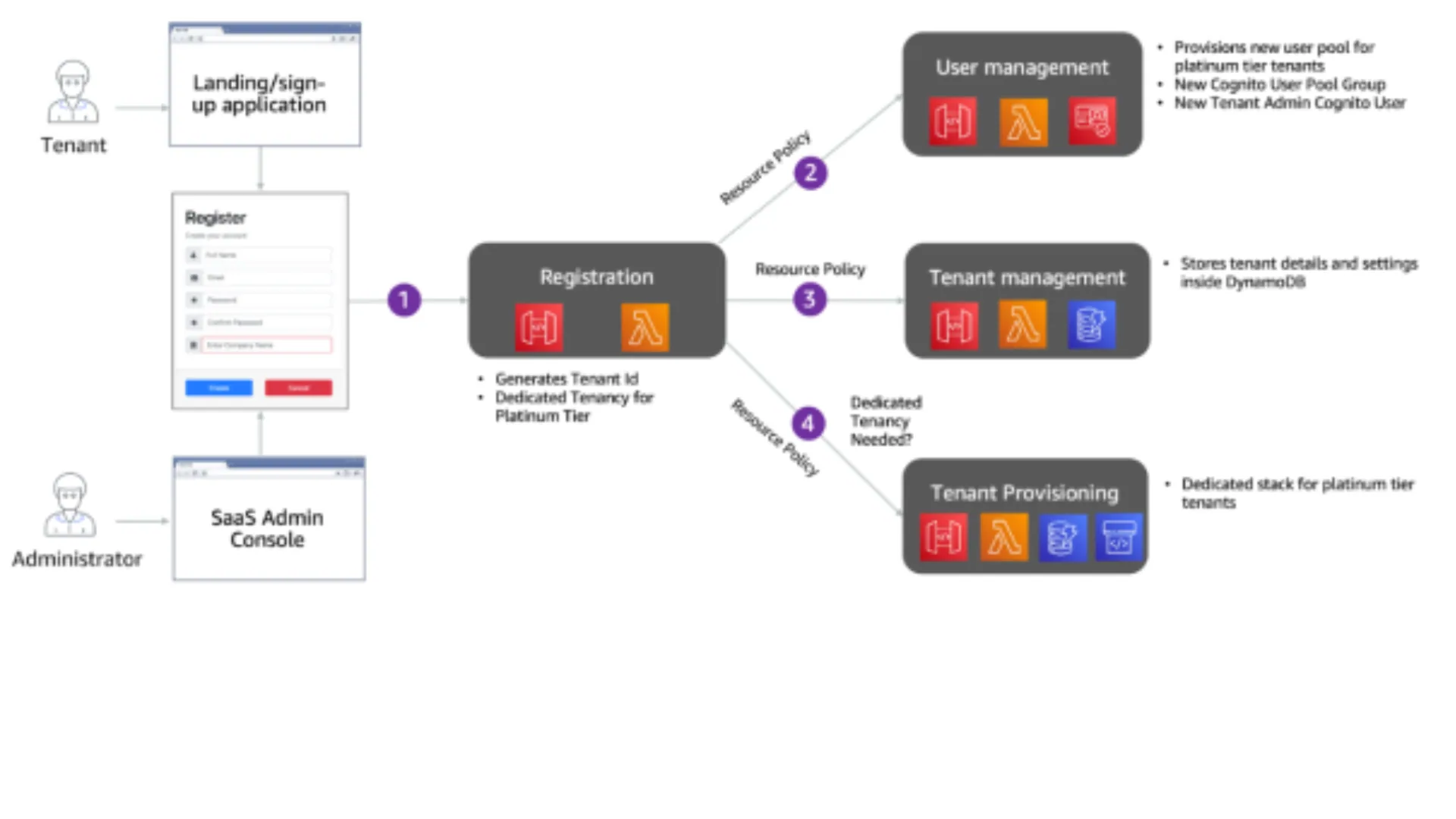
Step 2 of the flow invokes the User Management service to create a new tenant admin user. We have used Amazon Cognito as our identity provider. For Platinum tier tenants, you’ll notice that a separate user pool is provisioned for each tenant. For other tiers, the User Management service will create a Cognito UserGroup inside the pooled user pool for that tenant. Finally, a tenant admin user is created for the tenant inside the user pool.
Step 3 will then call the Tenant Management service to store tenant details. We also store the user pool information for the tenant, based upon the data collected from the prior step. The Tenant details also includes the API key, based upon the tenant tier selected.
Finally in step 4, Tenant Provisioning service is used to provision any tenant specific infrastructure for Platinum/silo tenants. It makes use of AWS CodePipeline to manage the deployment of tenant specific application services.
Authentication Flow
The following is a breakdown of the steps that are part of this authentication and routing experience :
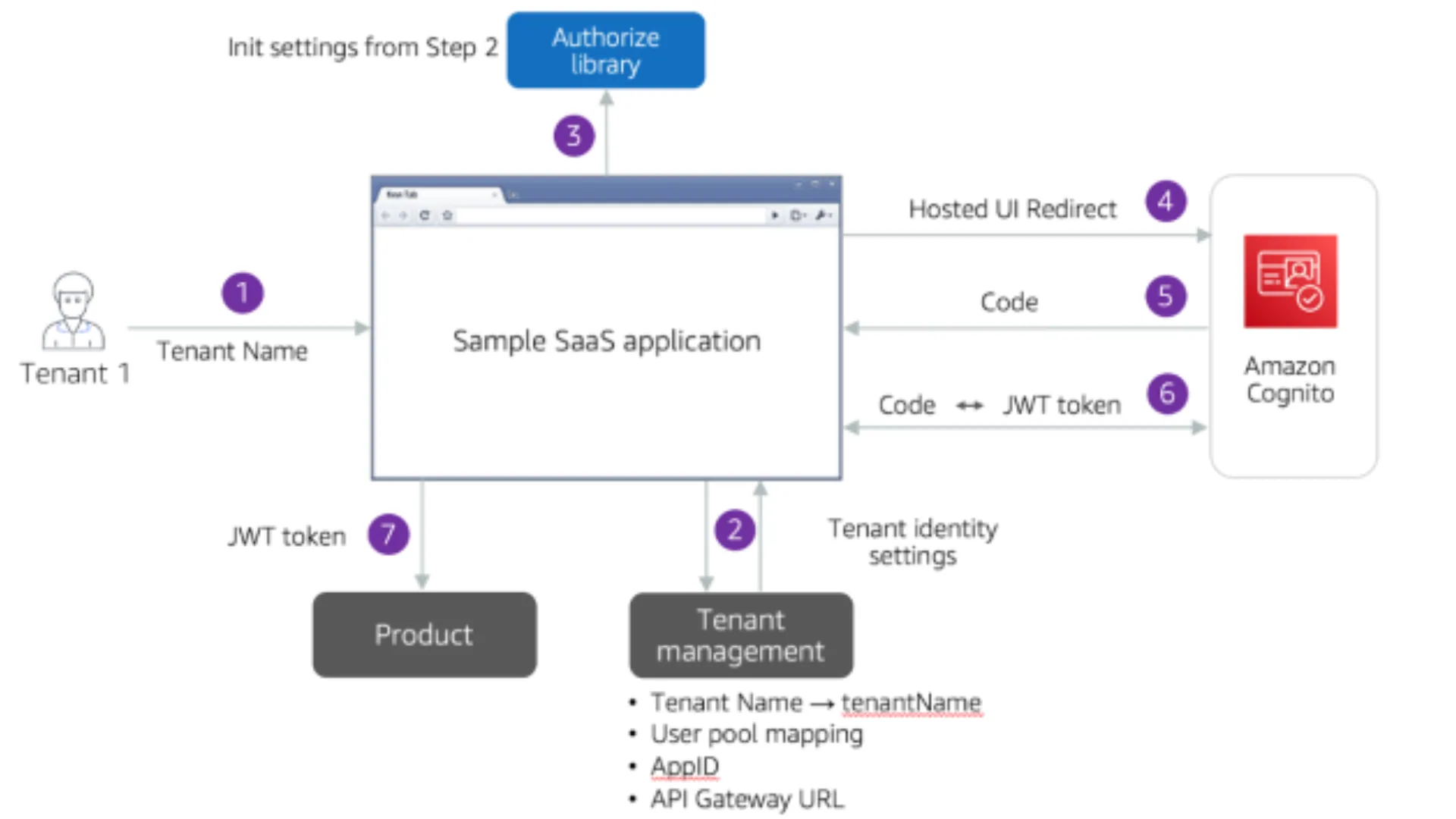
Step 1 – the tenant user is required to enter the tenant’s name as part of the login process. This tenant name is the same as provided during the registration process.
Step 2 – the tenant name is used to retrieve tenant specific information, namely user pool id, app client id and API Gateway URL.
Step 3 – this tenant specific information is passed onto the SaaS web application, which uses it to initialize the authorization code with these settings. This experience can be modified according to your needs. As an example, you can ask for user email address and use the email domain name to retrieve the necessary information. Another way could be to create subdomain for each tenant, such as tenant1.yoursaasapplication.com.
Step 4 – the application will be redirected to the Cognito hosted UI, associated with the tenant. This is where the user is required to provide his username and password.
Step 5 and 6 – these are a representation of the authorization code grant flow of Cognito. Cognito uses username and password to authenticate against the user pool. Once the login information is successfully validated, it issues an OAuth code in return. This OAuth code is sent back to Cognito which in return issues a JWT token.
Step 7 – shows how you can use the JWT token to authenticate against your microservices.
Authentication and Authorization:
For the serverless SaaS solution, we have used a Lambda Authorizer as part of the authentication and authorization model of the environment. Once authenticated, Cognito issues a JWT token that is passed with each request that is processed by the API Gateway.
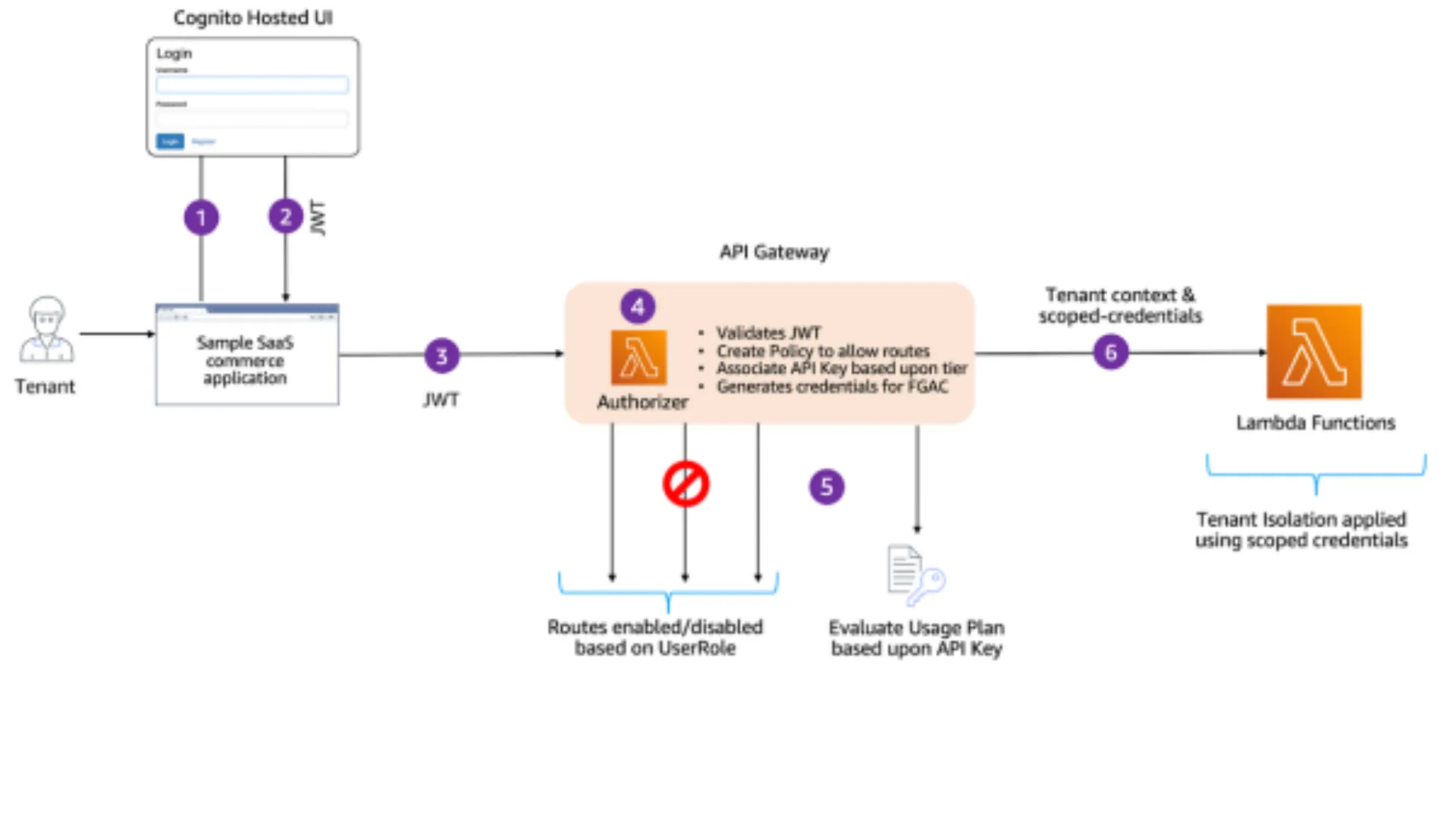
Step 1 and Step 2 are a representation of authentication flow that happens between the web application and Cognito Hosted UI. Once authenticated, the user is provided a JWT token that is used to invoke the API, as depicted in Step 3.
The Lambda authorizer further carries out a series of steps to validate and authorize the request, as highlighted in Step 4 above.
The first action is to validate whether the JWT is valid or not. This is achieved by validating the JWT against the user pool. Once validated, the authorizer then extracts the UserRole and TenantId from the validated Custom Claims.
This authorizer further allows specific API Gateway methods/routes based upon the user’s role. As an example, only system admin can make a request to get all of the system’s tenants.
The authorizer is also used to acquire API keys (that connect to usage plans). This is achieved by setting the API key source of our APIs as AUTHORIZER. This means that the authorizer is responsible for associating the API key with each incoming request.
The Lambda authorizer is also essential to the overall tenant isolation model of the SaaS reference solution. The idea here was to move the acquisition of isolation policies to the API Gateway authorizer (instead of doing this in each lambda function).
The basic approach here is to examine your tenant context and generate the tenant-scoped credentials that would control your access to other resources (storage, etc.). In this scenario, the authorizer will dynamically generate the IAM policies from the tenant context and acquire the short-lived credentials that will be used to enforce your tenant isolation.
As shown in Step 5, Lambda authorizer will now authorize the user and apply the Usage plan based on the API key returned by the authorizer. The authorizer also provides the short-lived credentials to the downstream Lambda function as part of the Lambda context. As shown in
Step 6, Lambda uses this to enforce tenant level isolation.
Tenant Isolation
Once the credentials are passed to a function of your microservice, you can then use the supplied credentials as you access tenant resources. The application of tenant isolation also varies by tenant tier, as shown in Figure below.
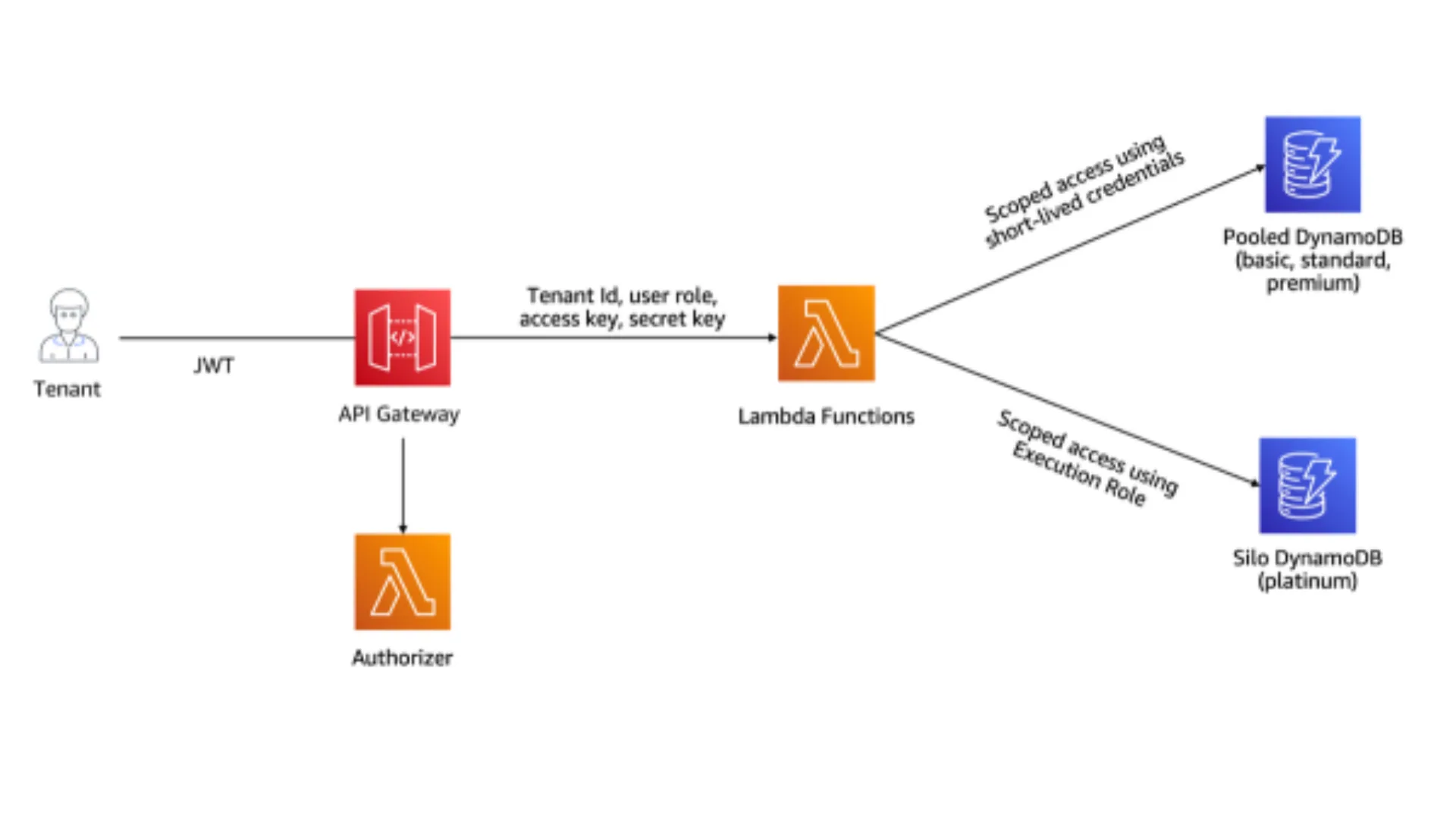
For pooled tenants, the lambda function uses the secret and access key provided by the Lambda Authorizer. As mentioned above, these credentials are scoped to access data for the current tenant only.
The strategy for silo tenants differs a bit, since we are provisioning siloed tables for each tenant. There is no need to apply the scoped credentials while accessing the DynamoDB table. Instead, the tenant execution role, applied during provisioning of lambda functions, restricts access to the specific table provisioned for that tenant.
At Cloudkida, two tenant strategies were implemented.
The technology stack used are :
The AWS serverless track is selected for the Cloudkida platform
Electromech implemented SaaS factory reference architecture with AWS serverless services and below benefit achieved.
The AWS SaaS Factory Serverless Framework offers several advantages for building and deploying software as a service (SaaS) applications:
With Electromech help, Cloudkida Pvt. Ltd. achieved and delivered the goal of multi-tenant architecture on AWS serverless platform which can provide not only all the functionality but with robust reliability, security, performance, ease of operational monitoring and management with the most cost effective environment.
29 serverless microservices created
1 default tenant
Automated onboarding of tenants achieved.
The implementation of AI Cloudkida Chat has significantly improved the user experience for Cloudkida’s cloud lab services. By providing an intuitive, efficient, and secure chatbot solution, Cloudkida has enabled users to access information quickly and accurately. The use of AWS services ensures that the system remains scalable, cost-effective, and capable of handling large volumes of concurrent queries without compromising performance. This intelligent system has not only increased user satisfaction but also optimized operational efficiency, making Cloudkida’s cloud labs more accessible and user-friendly.
More proof
Experiential learning
CloudKida, based in Ahmedabad, delivers experiential learning through cloud-based lab environments.
Higher education
~90% lift in information use
The full architecture behind GTU's generative AI programme: retrieval, identity, analytics and delivery, for one of India's largest public universities.
Higher education
A public generative AI solution answering campus information questions from published institutional content.
Next step
A short call with an AWS practice lead, not a sales qualification call. You will leave with a candid read on the work involved and the order to do it in.