








Introduction: Twenty Years of the Service That Changed Everything
In March 2006, Amazon Web Services quietly launched a storage service with a simple promise: store any amount of data, retrieve it any time, from anywhere. No servers to rack. No capacity to guess. Pay only for what you use.
That service was Amazon Simple Storage Service — Amazon S3.
Twenty years later, S3 stores more than 350 trillion objects and serves as the backbone of modern cloud architecture. It powers media streaming, machine learning pipelines, disaster recovery systems, data lakes, and static websites for millions of organisations worldwide.
If you work in cloud, you work with S3. This AWS S3 complete guide is built for developers and engineers who want to go from understanding the fundamentals to implementing S3 with confidence — covering everything from bucket basics to lifecycle policies, security hardening, and cost control.
At Electromech Cloudtech, we have spent years helping businesses migrate to AWS, build production-grade architectures, and manage cloud environments at scale. This guide captures what we have learned so you can implement S3 the right way — from day one.
Table of Contents
- What Is Amazon S3? A 20-Year Story
- Core S3 Concepts Every Engineer Must Know
- Setting Up Your First S3 Bucket (Step-by-Step)
- S3 Storage Classes Explained
- S3 Versioning and Lifecycle Policies
- S3 Security: Policies, Encryption, and Access Control
- S3 Performance Optimisation for Engineers
- Real-World Use Cases and Architecture Patterns
- S3 Cost Optimisation Strategies
- Common S3 Mistakes and How to Avoid Them
- How Electromech Cloudtech Helps You Get S3 Right
1. What Is Amazon S3? A 20-Year Story
The Launch That Redefined Storage
Amazon S3 launched on 14 March 2006 — making 2026 its 20th anniversary. At launch, it offered a radical idea: object storage via a web API, with no minimum capacity and no upfront cost.
Before S3, organisations either over-provisioned storage hardware and wasted capital, or under-provisioned and hit capacity ceilings at the worst moments. S3 eliminated both problems at once.
How S3 Has Evolved Over Two Decades
| Year | Milestone |
|---|---|
| 2006 | Amazon S3 launches in the US |
| 2007 | S3 expands internationally, EU region added |
| 2010 | S3 versioning introduced |
| 2011 | S3 lifecycle management released |
| 2013 | S3 server-side encryption with KMS |
| 2015 | S3 Transfer Acceleration launched |
| 2018 | S3 Block Public Access introduced |
| 2020 | S3 Object Lambda announced |
| 2021 | S3 Intelligent-Tiering expansion |
| 2023 | S3 Express One Zone for ultra-low latency |
| 2026 | 350+ trillion objects stored globally |
Every year has brought new capabilities that widen S3’s use from simple file storage to a fully programmable data platform.
Why S3 Still Dominates
S3’s dominance comes down to four things: durability, availability, simplicity, and ecosystem depth.
S3 offers 99.999999999% (eleven nines) of object durability by automatically distributing data across multiple Availability Zones within a region. Losing a file in S3 is not a realistic operational concern — which is why the entire AWS ecosystem treats S3 as a trusted foundation.
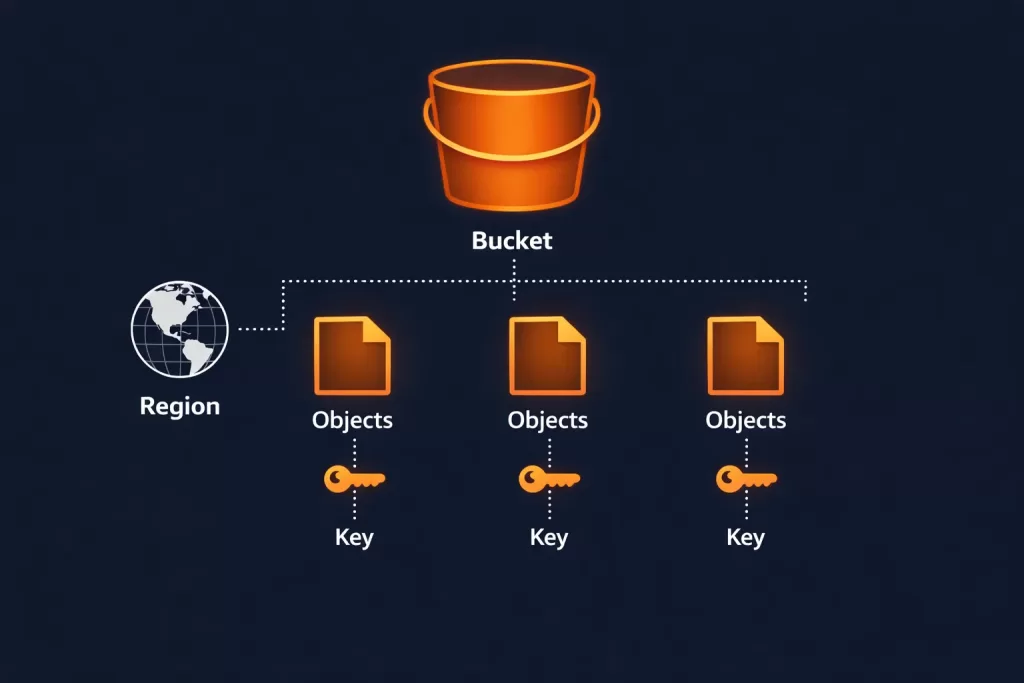
2. Core S3 Concepts Every Engineer Must Know
Before writing a single line of code or clicking through the console, make sure these concepts are clear. They will shape every architectural decision you make with S3.
Objects
Everything stored in S3 is an object. An object is a file plus its metadata. It can be anything — an image, a JSON payload, a compressed log archive, a video file, or a database backup. S3 has no concept of folders at the storage level, only key names that use slashes to mimic directory paths.
Buckets
A bucket is the top-level container for objects. Bucket names must be globally unique across all AWS accounts. When you create a bucket, you choose a region — and that is where your data physically lives unless you configure replication.
Keys
An object’s key is its full identifier within a bucket. For example: logs/2026/03/access.log. The prefix logs/2026/03/ looks like a folder path but is simply part of the key name. S3 uses prefixes for organising and querying objects at scale.
Regions
S3 buckets are regional. Data does not leave the AWS Region you create the bucket in unless you explicitly configure Cross-Region Replication (CRR). This is important for data residency compliance — a topic closely tied to Electromech’s Cloud Architecture Design practice.
Consistency Model
Since December 2020, S3 provides strong read-after-write consistency for all operations — including overwrites and deletes. You no longer need to design around eventual consistency. A successful write is immediately visible to any subsequent read.
3. Setting Up Your First S3 Bucket (Step-by-Step)
Via the AWS Console
Step 1 — Navigate to S3
Log in to the AWS Management Console and search for S3. Click Create bucket.
Step 2 — Name your bucket
Choose a globally unique name. Use lowercase letters, numbers, and hyphens. Avoid using account IDs or personally identifiable information in bucket names.
Good: my-app-assets-prod
Bad:  MyBucket123 (fails naming rules)
Bad:  bucket (not globally unique)
Step 3 — Choose a region
Select the AWS Region closest to your primary workload or required by your data compliance policy.
Step 4 — Block Public Access
Leave Block all public access enabled unless you are explicitly building a public website. This is the safest default.
Step 5 — Enable versioning (recommended)
Versioning protects against accidental deletes and overwrites. Enable it at creation — retrofitting it later is possible but versioning history starts from that point only.
Step 6 — Configure encryption
Choose SSE-S3 (default, managed by AWS) or SSE-KMS (managed by AWS Key Management Service, recommended for sensitive data). SSE-KMS gives you full audit trails via AWS CloudTrail.
Step 7 — Create the bucket
Click Create bucket. Your bucket is live within seconds.
Via the AWS CLI
If you prefer infrastructure-as-code patterns, the CLI is faster and repeatable.
bash
# Create a bucket
aws s3api create-bucket \
  --bucket my-app-assets-prod \
  --region ap-south-1 \
  --create-bucket-configuration LocationConstraint=ap-south-1

# Enable versioning
aws s3api put-bucket-versioning \
  --bucket my-app-assets-prod \
  --versioning-configuration Status=Enabled

# Block all public access
aws s3api put-public-access-block \
  --bucket my-app-assets-prod \
  --public-access-block-configuration \
    BlockPublicAcls=true,IgnorePublicAcls=true,\
    BlockPublicPolicy=true,RestrictPublicBuckets=true
Uploading Objects
bash
# Upload a single file
aws s3 cp ./report.pdf s3://my-app-assets-prod/reports/2026/report.pdf

# Sync an entire directory
aws s3 sync ./build/ s3://my-app-assets-prod/frontend/ \
  --delete \
  --cache-control "max-age=86400"
Via AWS SDK (Python / boto3)
python
import boto3

s3 = boto3.client('s3', region_name='ap-south-1')

# Upload a file
s3.upload_file(
    Filename='./data/backup.zip',
    Bucket='my-app-assets-prod',
    Key='backups/2026/03/backup.zip',
    ExtraArgs={
        'ServerSideEncryption': 'aws:kms',
        'StorageClass': 'STANDARD_IA'
    }
)

# Generate a presigned URL (expires in 1 hour)
url = s3.generate_presigned_url(
    'get_object',
    Params={
        'Bucket': 'my-app-assets-prod',
        'Key': 'backups/2026/03/backup.zip'
    },
    ExpiresIn=3600
)
print(url)
Not sure which AWS architecture fits your workload?
Electromech’s Cloud Readiness Assessment maps your existing systems to the right AWS services — including S3 storage strategy — before you commit to any infrastructure decisions.
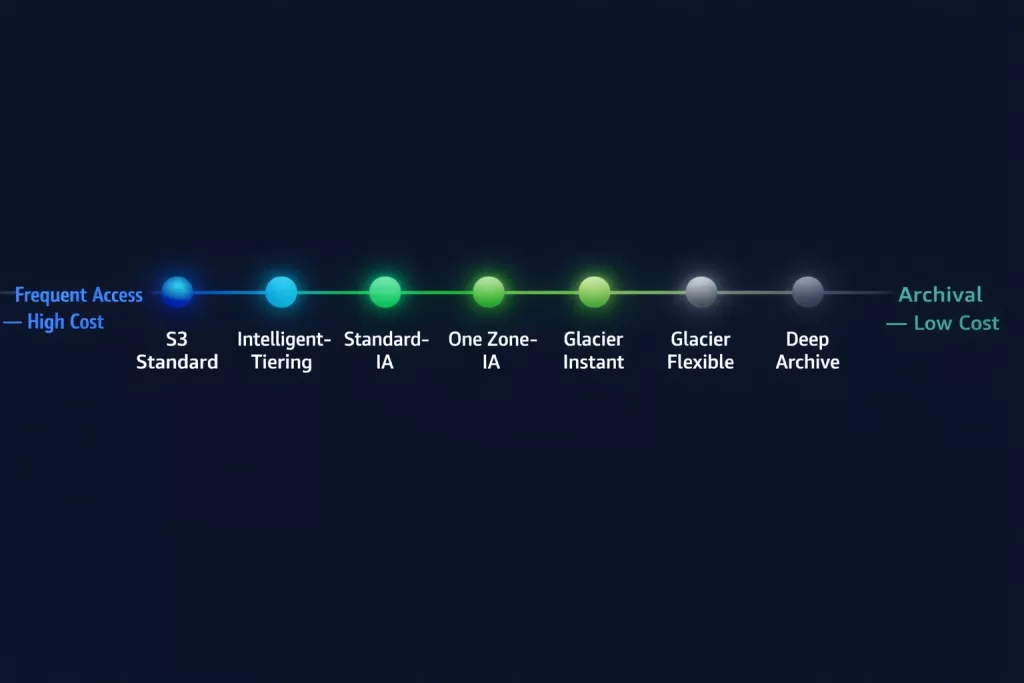
4. S3 Storage Classes Explained
One of S3’s most powerful — and underused — features is its range of storage classes. Choosing the right class for each workload reduces cost dramatically without changing your access patterns.
| Storage Class | Use Case | Retrieval | Durability | Cost |
|---|---|---|---|---|
| S3 Standard | Frequently accessed data | Milliseconds | 11 nines | Highest |
| S3 Intelligent-Tiering | Unknown or changing access patterns | Milliseconds | 11 nines | Auto-optimised |
| S3 Standard-IA | Infrequently accessed, rapid retrieval | Milliseconds | 11 nines | Lower storage, retrieval fee |
| S3 One Zone-IA | Non-critical, infrequent, single AZ | Milliseconds | 11 nines* | Lowest IA cost |
| S3 Glacier Instant Retrieval | Archival with millisecond access | Milliseconds | 11 nines | Low |
| S3 Glacier Flexible Retrieval | Archival, minutes-to-hours retrieval | Minutes–hours | 11 nines | Very low |
| S3 Glacier Deep Archive | Long-term compliance archival | 12 hours | 11 nines | Lowest |
| S3 Express One Zone | Ultra-low latency, single AZ | Sub-millisecond | High* | Performance premium |
*Single AZ classes do not replicate across Availability Zones.
Choosing the Right Storage Class
Use Standard for application assets, active databases, and anything accessed multiple times per month.
Use Intelligent-Tiering when your access patterns are unpredictable or you manage data on behalf of users. AWS automatically moves objects between frequent and infrequent tiers at no retrieval charge.
Use Standard-IA or Glacier Instant Retrieval for disaster recovery files, monthly reports, and compliance archives that need rapid access but are rarely touched. Electromech’s Disaster Recovery & Backup managed service is built on exactly these tiering patterns — keeping recovery costs low while keeping RTO targets achievable.
Use Glacier Deep Archive for seven-year regulatory archives, historical backups, and anything you hope never to access.
5. S3 Versioning and Lifecycle Policies
Versioning
Enabling versioning means S3 keeps every version of every object, including deleted ones. Delete markers are added instead of true deletions, allowing full recovery.
bash
# Restore a deleted object by removing its delete marker
aws s3api delete-object \
  --bucket my-app-assets-prod \
  --key reports/2026/report.pdf \
  --version-id <delete-marker-version-id>
Important: Versioning increases storage costs because every version is stored independently. Always pair versioning with lifecycle policies to control this.
Lifecycle Policies
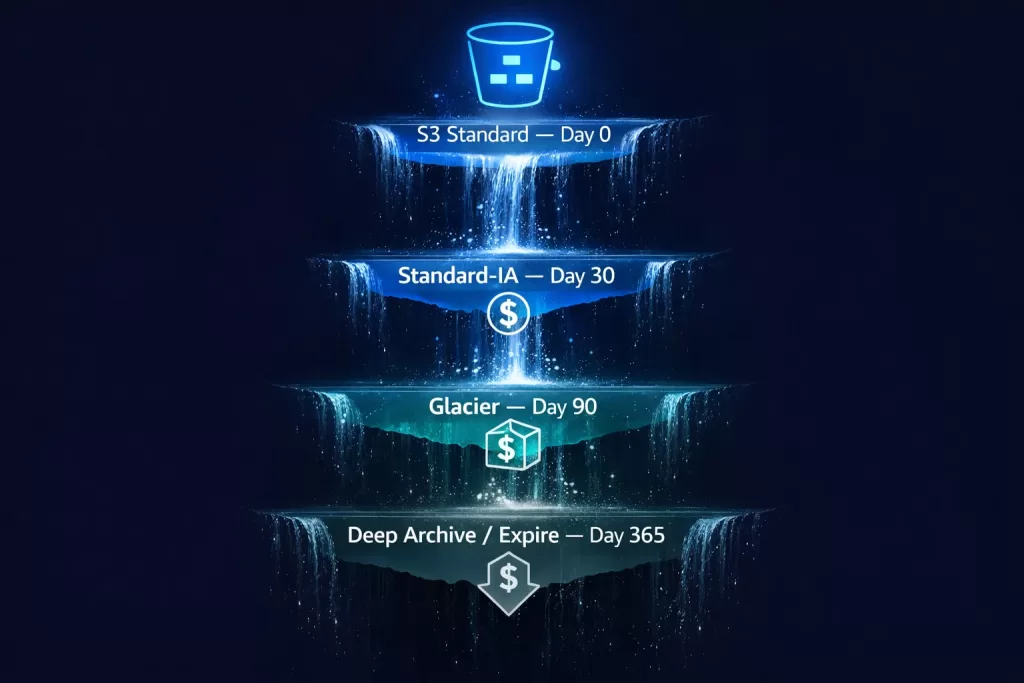
Lifecycle policies automate the movement and expiry of objects. They are the single most effective cost optimisation lever in S3.
Example policy: move objects to cheaper tiers and expire old versions
json
{
  "Rules": [
    {
      "ID": "Archive and expire old logs",
      "Status": "Enabled",
      "Filter": {
        "Prefix": "logs/"
      },
      "Transitions": [
        {
          "Days": 30,
          "StorageClass": "STANDARD_IA"
        },
        {
          "Days": 90,
          "StorageClass": "GLACIER"
        }
      ],
      "Expiration": {
        "Days": 365
      },
      "NoncurrentVersionTransitions": [
        {
          "NoncurrentDays": 30,
          "StorageClass": "GLACIER"
        }
      ],
      "NoncurrentVersionExpiration": {
        "NoncurrentDays": 90
      }
    }
  ]
}
Apply this via the CLI:
bash
aws s3api put-bucket-lifecycle-configuration \
  --bucket my-app-assets-prod \
  --lifecycle-configuration file://lifecycle.json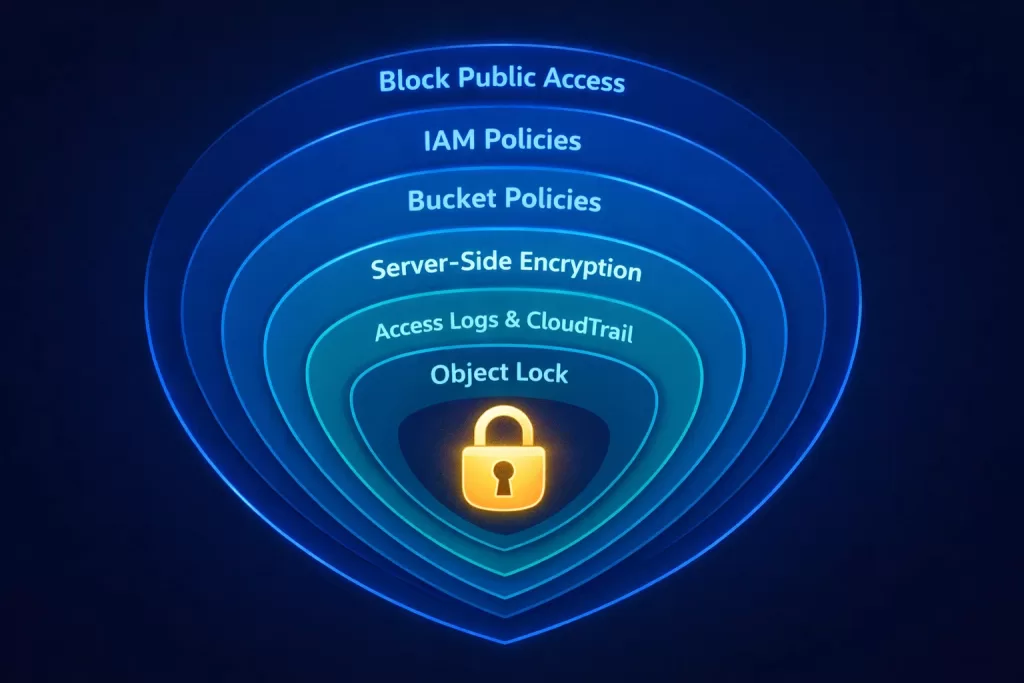
6. S3 Security: Policies, Encryption, and Access Control
Security in S3 operates in layers. Think of it as concentric rings — each one adding protection. Engineers who understand all layers build significantly more robust architectures.
For organisations that need continuous security monitoring across their entire AWS environment, Electromech’s Security Threat and Response managed service provides real-time detection and incident response — including S3 access anomaly alerts and automated remediation.
Layer 1 — Block Public Access (Account and Bucket Level)
Always enable Block Public Access at the account level in addition to the bucket level. This prevents any future bucket from accidentally becoming public.
bash
aws s3control put-public-access-block \
  --account-id <your-account-id> \
  --public-access-block-configuration \
    BlockPublicAcls=true,IgnorePublicAcls=true,\
    BlockPublicPolicy=true,RestrictPublicBuckets=true
Layer 2 — IAM Policies
Grant S3 access via IAM roles and policies, not long-lived access keys. Follow the principle of least privilege.
json
{
  "Version": "2012-10-17",
  "Statement": [
    {
      "Sid": "AllowAppReadWrite",
      "Effect": "Allow",
      "Action": [
        "s3:GetObject",
        "s3:PutObject",
        "s3:DeleteObject"
      ],
      "Resource": "arn:aws:s3:::my-app-assets-prod/app/*"
    },
    {
      "Sid": "AllowListBucket",
      "Effect": "Allow",
      "Action": "s3:ListBucket",
      "Resource": "arn:aws:s3:::my-app-assets-prod",
      "Condition": {
        "StringLike": {
          "s3:prefix": ["app/*"]
        }
      }
    }
  ]
}
Layer 3 — Bucket Policies
Bucket policies are resource-based policies attached to the bucket itself. Use them to enforce encryption, restrict access to specific VPCs, or grant cross-account access.
Enforce HTTPS-only access:
json
{
  "Version": "2012-10-17",
  "Statement": [
    {
      "Sid": "DenyHTTP",
      "Effect": "Deny",
      "Principal": "*",
      "Action": "s3:*",
      "Resource": [
        "arn:aws:s3:::my-app-assets-prod",
        "arn:aws:s3:::my-app-assets-prod/*"
      ],
      "Condition": {
        "Bool": {
          "aws:SecureTransport": "false"
        }
      }
    }
  ]
}
Layer 4 — Server-Side Encryption
SSE-S3: AWS manages keys. Zero overhead. Good baseline.
SSE-KMS: You control keys via AWS KMS. CloudTrail logs every key usage. Required for compliance workloads (PCI-DSS, HIPAA, SOC 2).
SSE-C: You provide and manage your own encryption keys. Maximum control, maximum responsibility.
Enforce KMS encryption via bucket policy:
json
{
  "Sid": "DenyNonKMSEncryption",
  "Effect": "Deny",
  "Principal": "*",
  "Action": "s3:PutObject",
  "Resource": "arn:aws:s3:::my-app-assets-prod/*",
  "Condition": {
    "StringNotEquals": {
      "s3:x-amz-server-side-encryption": "aws:kms"
    }
  }
}
Layer 5 — S3 Access Logs and CloudTrail
Enable S3 server access logging to capture every request made to your bucket. Enable AWS CloudTrail data events for S3 to get API-level audit trails. Both are essential for security investigations and compliance audits. Electromech’s Application Monitoring service integrates these logs into centralised dashboards with real-time alerting.
bash
# Enable server access logging
aws s3api put-bucket-logging \
  --bucket my-app-assets-prod \
  --bucket-logging-status '{
    "LoggingEnabled": {
      "TargetBucket": "my-access-logs",
      "TargetPrefix": "s3/my-app-assets-prod/"
    }
  }'
Layer 6 — S3 Object Lock
For compliance use cases requiring WORM (Write Once, Read Many) storage, enable S3 Object Lock. Objects cannot be deleted or overwritten for the duration of a retention period — even by the bucket owner.
bash
# Enable Object Lock at bucket creation (cannot be enabled after)
aws s3api create-bucket \
  --bucket my-compliance-archive \
  --region ap-south-1 \
  --create-bucket-configuration LocationConstraint=ap-south-1 \
  --object-lock-enabled-for-bucket
7. S3 Performance Optimisation for Engineers
S3 scales automatically, but how you interact with it determines whether you see optimal throughput or unnecessary bottlenecks.
Prefix Distribution for High-Throughput Workloads
S3 supports 3,500 PUT/COPY/POST/DELETE requests per second and 5,500 GET/HEAD requests per second per prefix. For workloads exceeding these limits, distribute objects across multiple prefixes.
Instead of:
logs/access-2026-03-18-001.log
logs/access-2026-03-18-002.log
Use hashed prefixes:
a3f/logs/access-2026-03-18-001.log
b7c/logs/access-2026-03-18-002.log
Multipart Uploads
For files larger than 100MB, always use multipart upload. It improves throughput, allows retry of failed parts, and enables parallel uploads.
python
import boto3
from boto3.s3.transfer import TransferConfig

s3 = boto3.client('s3')

config = TransferConfig(
    multipart_threshold=1024 * 25,    # 25MB threshold
    max_concurrency=10,
    multipart_chunksize=1024 * 25,    # 25MB per part
    use_threads=True
)

s3.upload_file(
    './large-dataset.tar.gz',
    'my-app-assets-prod',
    'datasets/large-dataset.tar.gz',
    Config=config
)
S3 Transfer Acceleration
For globally distributed uploads — where users are far from the bucket’s region — enable S3 Transfer Acceleration. It routes uploads through AWS CloudFront edge locations to your bucket.
bash
aws s3api put-bucket-accelerate-configuration \
  --bucket my-app-assets-prod \
  --accelerate-configuration Status=Enabled
Use the accelerated endpoint:
my-app-assets-prod.s3-accelerate.amazonaws.comS3 with Amazon CloudFront
For read-heavy workloads serving static assets globally, put Amazon CloudFront in front of S3. This caches content at edge locations and removes load from S3 entirely for repeated reads. Configure Origin Access Control (OAC) to ensure CloudFront is the only entry point to your private bucket.
Electromech’s Customer Enablement service covers exactly this pattern — CloudFront, WAF, load balancer, and firewall configurations designed for production-grade performance and security.
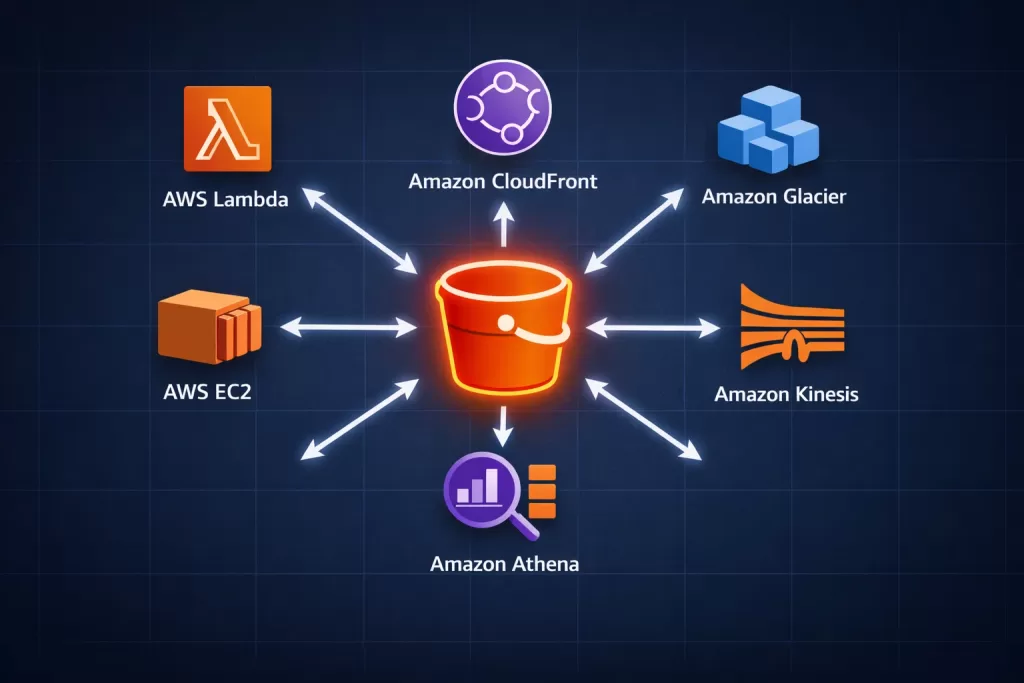
8. Real-World Use Cases and Architecture Patterns
Static Website Hosting
S3 can serve static HTML, CSS, JavaScript, and assets directly. Combined with CloudFront and Route 53, this creates a globally distributed, virtually zero-maintenance web architecture.
Architecture: Route 53 → CloudFront → S3 Bucket (with OAC)
Data Lake Foundation
S3 is the de facto storage layer for AWS data lake architectures. Pair it with AWS Glue for cataloguing, Amazon Athena for SQL queries directly on S3 objects, and Amazon EMR for large-scale processing.
Architecture: Ingestion (Kinesis / DMS) → S3 (raw zone) → Glue ETL → S3 (curated zone) → Athena / Redshift Spectrum
Application Backup and Disaster Recovery
Use S3 Cross-Region Replication (CRR) to automatically replicate objects to a secondary region. Combine with S3 Versioning to maintain point-in-time recovery capability.
bash
# Configure cross-region replication
aws s3api put-bucket-replication \
  --bucket my-app-assets-prod \
  --replication-configuration file://replication.json
Electromech’s Disaster Recovery & Backup service implements this architecture for clients across industries — with defined RTO and RPO targets, automated failover testing, and ongoing monitoring. See how this worked in practice for Torrent Pharma’s SFA & DR implementation.
Serverless Media Processing Pipeline
Trigger AWS Lambda functions on S3 PUT events to automatically process uploaded media — transcoding videos, resizing images, or extracting metadata — without maintaining any server infrastructure.
Architecture: Upload to S3 → S3 Event Notification → Lambda → Processed output to S3
This is a core pattern in Electromech’s Serverless architecture practice, including Serverless, Container, and EC2-based architectures.
Log Aggregation and Archival
Centralise application, infrastructure, and security logs from across your AWS environment into a dedicated S3 bucket. Apply lifecycle policies to transition to Glacier after 90 days and expire after 7 years for regulatory compliance. Electromech’s Application Monitoring service integrates this pattern with real-time alerting and dashboards.
IoT Data Ingestion
S3 serves as the landing zone for high-velocity IoT telemetry. Stream sensor data through AWS IoT Core into S3, then analyse it with Athena or feed it into a time-series database. This is central to Electromech’s Industrial IoT and Machine Automation practice and the Analytics and Dashboard service.
9. S3 Cost Optimisation Strategies
S3 billing has four components: storage, requests, data transfer, and replication. Optimising each one independently delivers significant savings.
Storage Cost Optimisation
- Use lifecycle policies to automatically move infrequently accessed objects to cheaper storage classes.
- Enable S3 Intelligent-Tiering for unpredictable workloads — the monitoring fee pays for itself within a month on most datasets.
- Delete incomplete multipart uploads — they consume storage without being accessible.
bash
# Clean up incomplete multipart uploads
aws s3api put-bucket-lifecycle-configuration \
  --bucket my-app-assets-prod \
  --lifecycle-configuration '{
    "Rules": [{
      "ID": "cleanup-incomplete-multiparts",
      "Status": "Enabled",
      "Filter": {},
      "AbortIncompleteMultipartUpload": {
        "DaysAfterInitiation": 7
      }
    }]
  }'
Request Cost Optimisation
- Aggregate small writes into larger objects where possible.
- Use S3 Batch Operations for bulk object management instead of looping through individual API calls.
- Cache frequently read objects with CloudFront to reduce GET request volume.
Data Transfer Cost Optimisation
- Keep compute in the same region as your S3 bucket — in-region data transfer is free.
- Use S3 VPC Gateway Endpoints for traffic between EC2/Lambda and S3 to avoid NAT Gateway charges.
- Enable CloudFront to serve assets from edge — CloudFront-to-internet transfer is cheaper than direct S3-to-internet.
bash
# Create VPC Gateway Endpoint for S3 (no hourly charge)
aws ec2 create-vpc-endpoint \
  --vpc-id vpc-xxxxxxxxx \
  --service-name com.amazonaws.ap-south-1.s3 \
  --route-table-ids rtb-xxxxxxxxx
Storage Lens for Visibility
Enable S3 Storage Lens to get organisation-wide visibility into storage usage, activity metrics, and cost optimisation recommendations across all buckets and accounts. Electromech’s Managed Services (SysOps) team reviews Storage Lens dashboards as part of monthly cost governance for managed clients — and License Management ensures you are never paying for capacity you are not using.
10. Common S3 Mistakes and How to Avoid Them
In our work at Electromech Cloudtech, we consistently see the same misconfigurations across organisations of all sizes. Here is what to watch for.
Mistake 1 — Public Buckets Without Intention
The most dangerous S3 misconfiguration is an unintentionally public bucket. Always enable Block Public Access at the account level. Use AWS Config rule s3-bucket-public-read-prohibited to detect violations automatically. Electromech’s Well-Architected Review includes automated security checks across your entire AWS environment — surfacing this and dozens of similar risks in a single engagement.
Mistake 2 — No Encryption at Rest
Encryption is not optional for production workloads. Set a default encryption policy on every bucket and enforce KMS encryption via bucket policy for sensitive data.
Mistake 3 — Missing Lifecycle Policies
Organisations that do not configure lifecycle policies accumulate years of stale objects in Standard storage, paying full price for data that should have moved to Glacier or been deleted long ago. Audit your buckets with Storage Lens quarterly.
Mistake 4 — Versioning Without Expiry Rules
Versioning is powerful but doubles (or triples) storage costs if old versions are never expired. Always pair versioning with a NoncurrentVersionExpiration lifecycle rule.
Mistake 5 — Using Access Keys Instead of IAM Roles
Long-lived access keys are a security liability. Every application on EC2, ECS, Lambda, or EKS should access S3 via an IAM role, not an access key stored in environment variables or code. This is a foundational check in every AWS Solutions Services engagement Electromech delivers.
Mistake 6 — Ignoring Request Metrics
Without S3 request metrics enabled, you are flying blind on performance and cost. Enable request metrics via CloudWatch and set alerts on 4xx error rates — they often indicate IAM policy issues or application bugs before they become incidents.
bash
# Enable request metrics for the entire bucket
aws s3api put-bucket-metrics-configuration \
  --bucket my-app-assets-prod \
  --id EntireBucket \
  --metrics-configuration '{"Id": "EntireBucket"}'
Mistake 7 — Skipping a Well-Architected Review
Many teams build and then never audit. A Well-Architected Review from Electromech gives you a structured assessment across all five AWS pillars — with S3 best practices evaluated as part of the Security and Cost Optimisation lenses.
11. How Electromech Cloudtech Helps You Get S3 Right
Twenty years of Amazon S3 evolution means the service is more capable — and more complex — than ever. Getting S3 right involves decisions that span architecture, security, cost, performance, and compliance. A misconfigured bucket or a missing lifecycle policy can cost significant money in unnecessary bills or expose sensitive data to the public internet.
Electromech Cloudtech works with engineering teams across India and globally to design, implement, and manage AWS environments that are secure, optimised, and production-ready from day one.
Cloud Strategy & Architecture
We assess your existing infrastructure, design your AWS target architecture, and define your S3 strategy — storage classes, lifecycle policies, access controls, and replication — before a single resource is provisioned.
Cloud Migration
We migrate your workloads — including S3-based data lakes, backup pipelines, and application storage — with zero data loss and minimal downtime. Hybrid and multi-cloud configurations are fully supported.
AWS Managed Services
Once you are on AWS, we manage it. S3 governance is part of every managed services engagement: monitoring for public access drift, enforcing encryption standards, auditing lifecycle policies, and keeping storage costs optimised month over month.
- Managed Services (SysOps)
- Application Monitoring
- Security Threat and Response
- Disaster Recovery & Backup
Application Modernization
Moving from legacy architectures to cloud-native? S3 is the backbone of modern application storage, media pipelines, and serverless processing.
AWS Portfolio & Well-Architected Reviews
Already running on AWS? Let us audit it. An Electromech Well-Architected Review surfaces S3 misconfigurations, over-provisioned storage, missing lifecycle policies, and security gaps — with a prioritised remediation roadmap.
Ready to Build on 20 Years of AWS S3 Innovation?
Whether you are setting up your first bucket or re-architecting an enterprise data platform, Electromech Cloudtech brings the AWS expertise to do it right.
📞 +91 75748 77958
✉️ info@electromech.cloudSchedule a Free 30-Minute Cloud Consultation →
Explore All AWS Services →
Contact Us →
Conclusion: S3 at 20 — Still the Foundation of Modern Cloud
Amazon S3 has spent two decades earning its place as the most trusted object storage service in the world. What started as a simple HTTP-accessible file store has grown into a programmable storage platform with tiering intelligence, event-driven processing, compliance-grade locking, and sub-millisecond performance tiers.
For developers and engineers, S3 mastery is not optional — it is foundational. Understanding storage classes saves money. Configuring security layers protects your users. Implementing lifecycle policies turns reactive storage into a managed, self-optimising asset.
The next 20 years of S3 will bring further capabilities we cannot yet predict. But the engineers who understand the fundamentals deeply — buckets, keys, policies, encryption, lifecycle — will be ready to use every new feature from day one.
Start with the right architecture. Start with Electromech Cloudtech.
Frequently Asked Questions
What is the maximum object size in Amazon S3?
A single S3 object can be up to 5 terabytes. For objects larger than 5GB, you must use multipart upload.
Is Amazon S3 a file system?
No. S3 is an object store, not a file system. It does not support file locking, append operations (natively), or hierarchical directories. For file system semantics on AWS, use Amazon EFS or Amazon FSx.
How durable is Amazon S3?
S3 Standard and most storage classes provide 99.999999999% (eleven nines) durability. This is achieved by storing data redundantly across a minimum of three Availability Zones.
Can I host a website directly on S3?
Yes. S3 static website hosting serves HTML, CSS, and JavaScript directly. For HTTPS and a custom domain, pair S3 with Amazon CloudFront. Electromech’s Customer Enablement service handles this full-stack setup — including WAF and security configuration.
What is S3 Intelligent-Tiering and when should I use it?
Intelligent-Tiering monitors object access patterns and automatically moves objects between frequent and infrequent access tiers. Use it when you cannot predict how often objects will be accessed, or when you manage data on behalf of many users with varying access patterns.
How do I prevent accidental deletion in S3?
Enable versioning so deleted objects are recoverable via delete markers. For compliance environments, use S3 Object Lock to enforce WORM (Write Once, Read Many) retention policies that prevent deletion even by privileged users.
How can Electromech help with our AWS S3 setup?
Electromech offers end-to-end AWS support — from a Cloud Readiness Assessment and architecture design through to managed operations and Well-Architected Reviews. Schedule a call to discuss your requirements.